Documentation · Jira Cloud · Toine.com B.V.
Test Summary Report for Jira
Pick a release, a sprint or a JQL filter. The report reads the work, the test evidence and the defects in it and puts your summary, deviations, risks and recommendation next to the numbers. Mark it final and it locks, signed and versioned.
Marketplace listing · 30 day free trial, paid via Atlassian · Support: contact@toine.com · Updated 2026-10-07
What it does
Test Summary Report for Jira produces the document a steering committee asks for at the end of every release or sprint, without a spreadsheet and without a Friday evening.
A report starts from a scope: a release (fix version), a sprint by name, or a JQL filter inside the project. The app reads every issue in it and computes the numbers. Scope: work items by type and by status. Execution: for each work item, whether its linked tests passed, failed, were not run, or do not exist, per area and in total, with the pass rate and the share of items that carry a test. Defects: how many are in scope, how many are open and at which priority, the list of open ones, how many were resolved.
Next to the numbers sits the narrative, in the shape of a test completion report: summary, verdict (fit for release, fit with conditions, not fit), conditions, deviations from the plan, outstanding risks and the recommendation. It saves as you type.
Works with Jira Cloud, company-managed and team-managed projects.
Demo video
About a minute: the core features and the user flow, recorded in the app's demo mode with sample data from a fictional payments team. Every step carries a caption. Test Summary Report: the end of test report, computed from Jira and written in the app.
Key features
The numbers, read straight from Jira
Work items by status, test evidence per item and per area, the areas with no test at all, open defects by priority with the list. Every number opens the issues behind it.
The words, written next to them
Summary, verdict with conditions, deviations from the plan, outstanding risks and the recommendation, in the shape of an ISO 29119 test completion report. Saves as you type.
Final means final
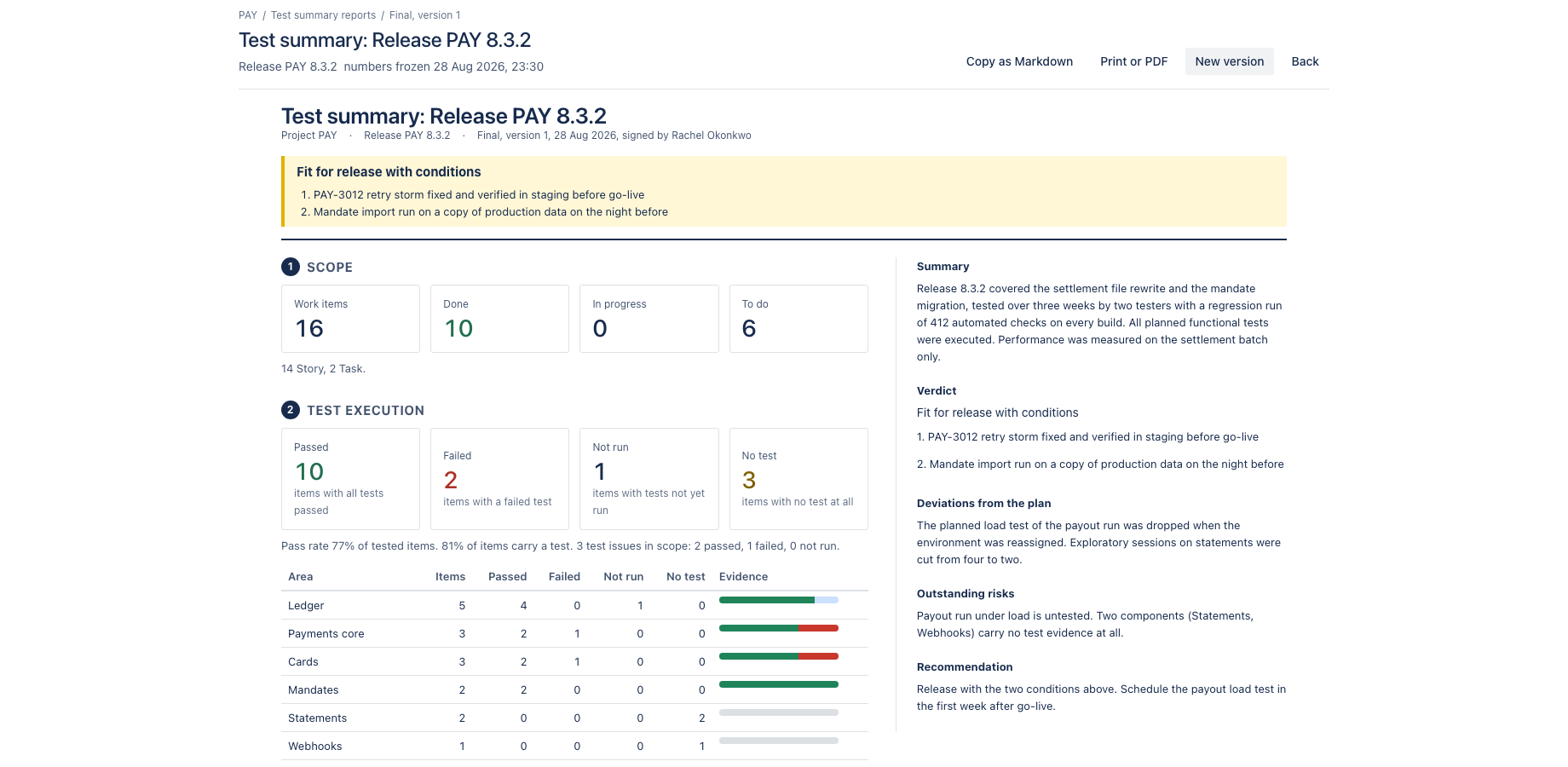
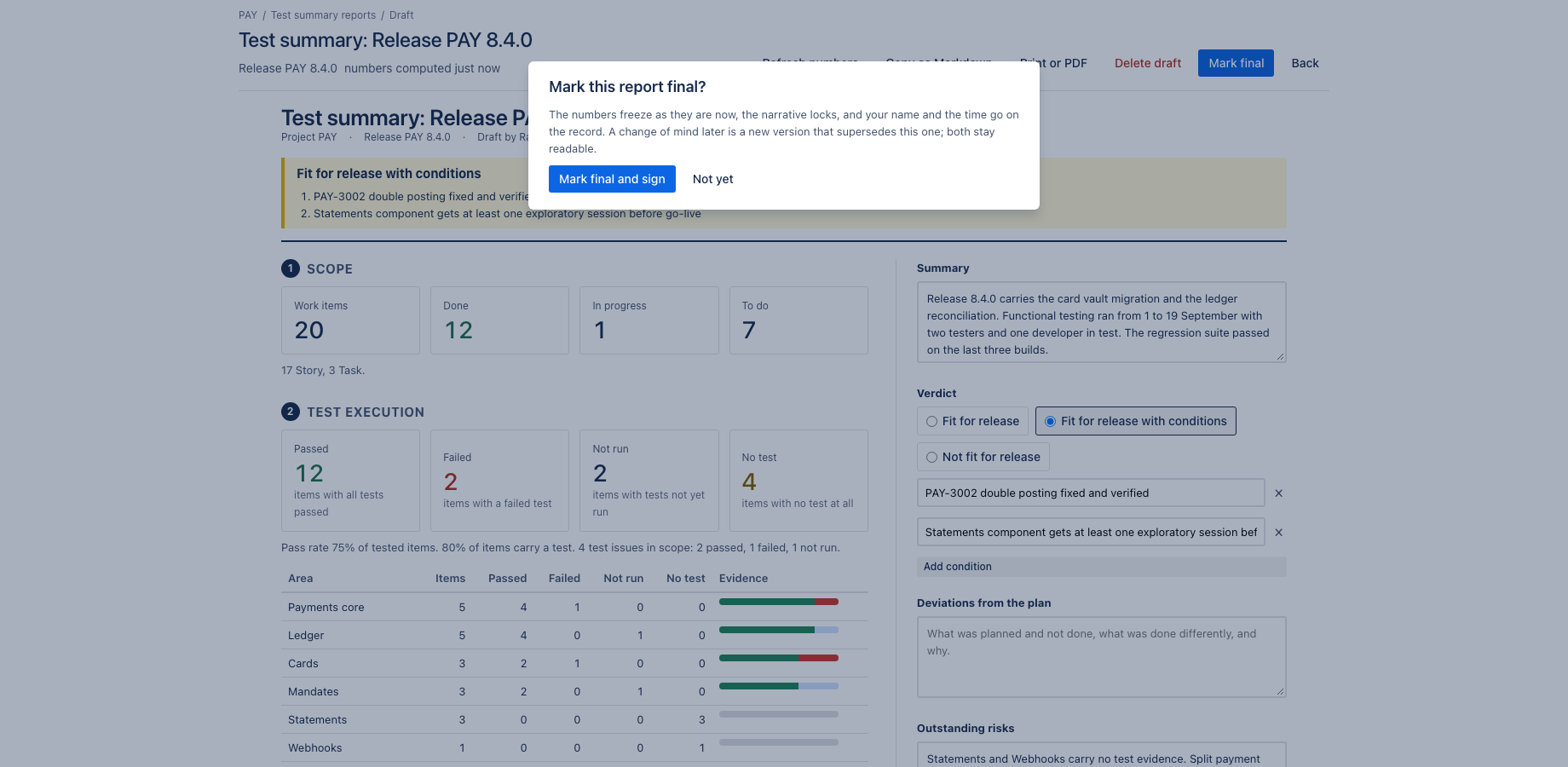
Marking a report final freezes the numbers, locks the narrative and records who signed and when. A change of mind is a new version that supersedes the old one. Print to PDF or copy as Markdown for the wiki.
While a report is a draft, the numbers can be refreshed from Jira at any time. Marking it final freezes the numbers, locks the narrative and records the signer and the time. A change of mind is a new version that supersedes the old one; both stay readable. Print to PDF from the browser, or copy the whole report as Markdown for a wiki page or a mail.
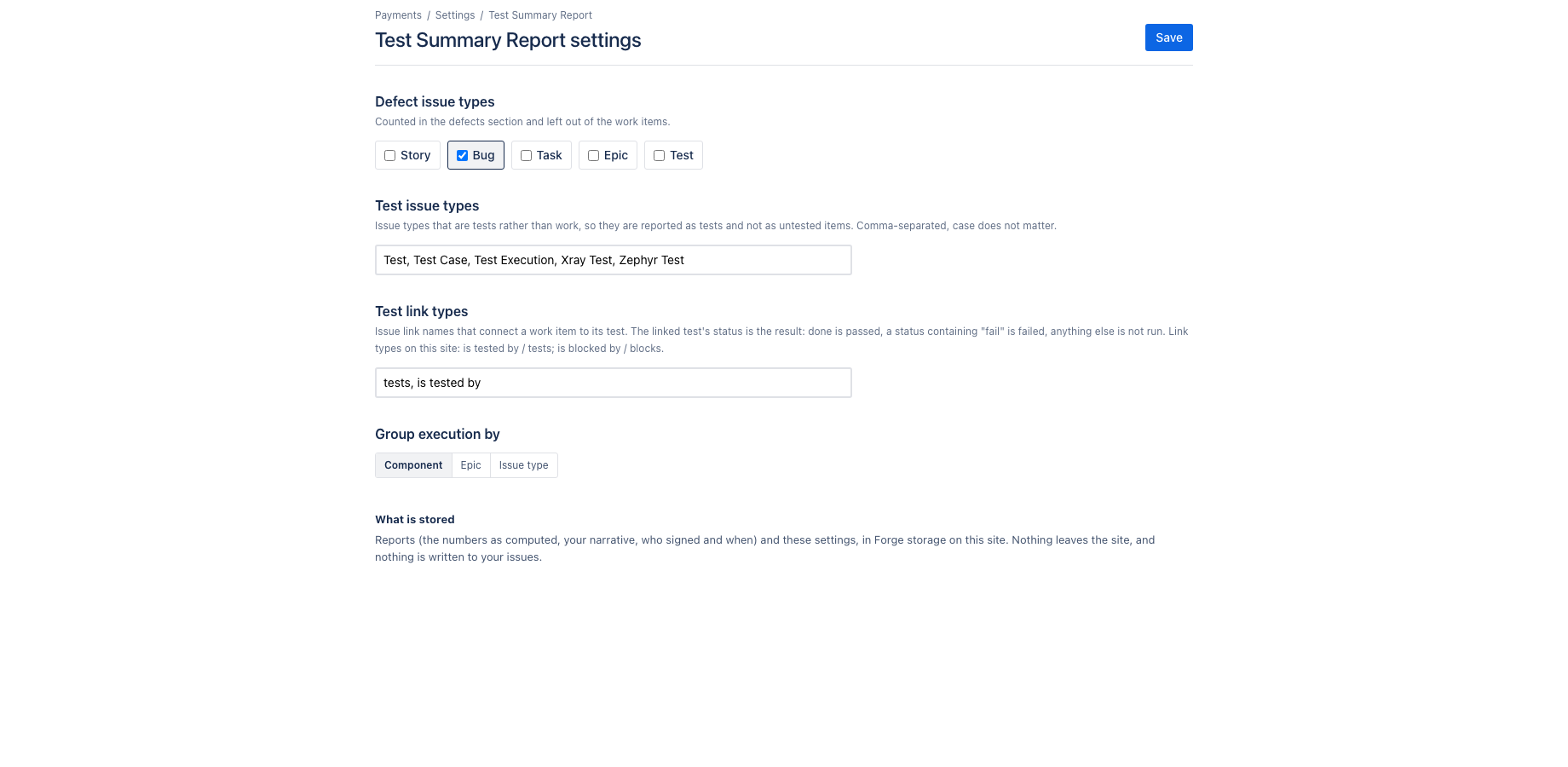
Test evidence is read from issue links of the type "tests" and "is tested by", which is how Xray, Zephyr and plain Jira test issues expose it, so no test tool integration is needed. Issue types that count as defects or as tests, the link types and the grouping are set per project.
What it does not do: it writes nothing to your issues, it calls no external service, and it keeps reports and settings in Forge storage on your site. That is why it qualifies for the Runs on Atlassian programme.
Where it appears in Jira
- Project page
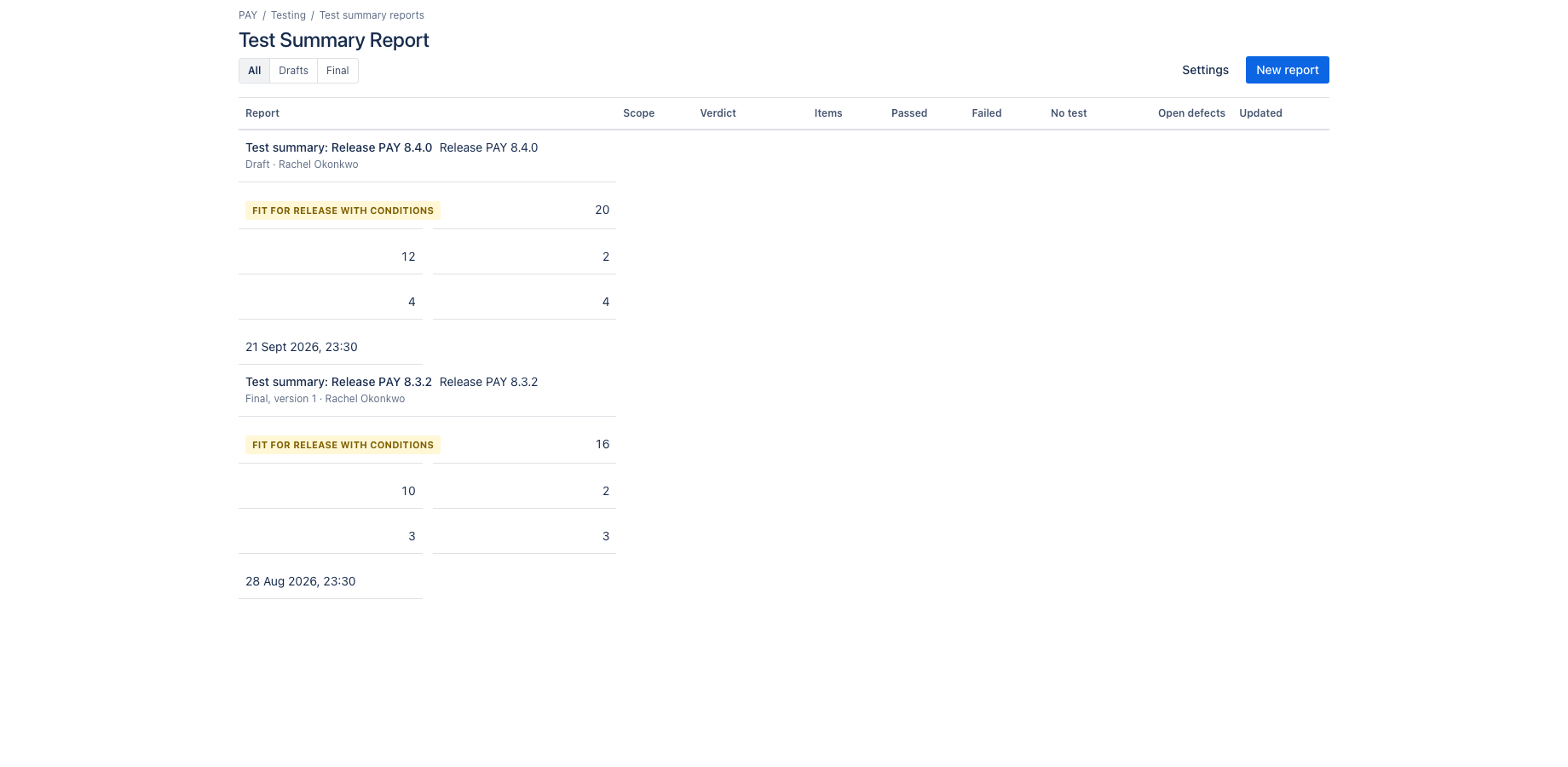
- Test Summary Report in the sidebar of every project: all reports of the project, drafts and finals.
- Project settings
- Project settings, Test Summary Report: defect types, test types, link types, grouping and sections.
- Dashboard gadget
- Test summary gadget: the latest final verdict of a project.
- Global page
- Apps, Test Summary Report: reports across projects.
Install and set up
Before you start
A Jira project with a release (fix version), a sprint or a JQL filter to report on. Test evidence is read from issue links of type tests and is tested by. Which issue types count as defects and as tests is set per project.
Install
- In Jira, open Apps in the top bar and choose Explore more apps. Search for Test Summary Report for Jira and click Try it free. You need to be a Jira site administrator.
- Review the permissions. The app asks for
read:jira-work,read:jira-user,storage:app. It cannot create, change or delete anything in Jira. - The 30 day trial starts on install. Billing after the trial is per user through Atlassian; nothing is charged if you uninstall before the trial ends.
Set up
- Open a project and click Test Summary Report in the sidebar.
- Go to Project settings, Test Summary Report. Confirm the issue types that count as defects and as tests, the link types that connect a test to a work item, and how execution is grouped (component, epic or issue type).
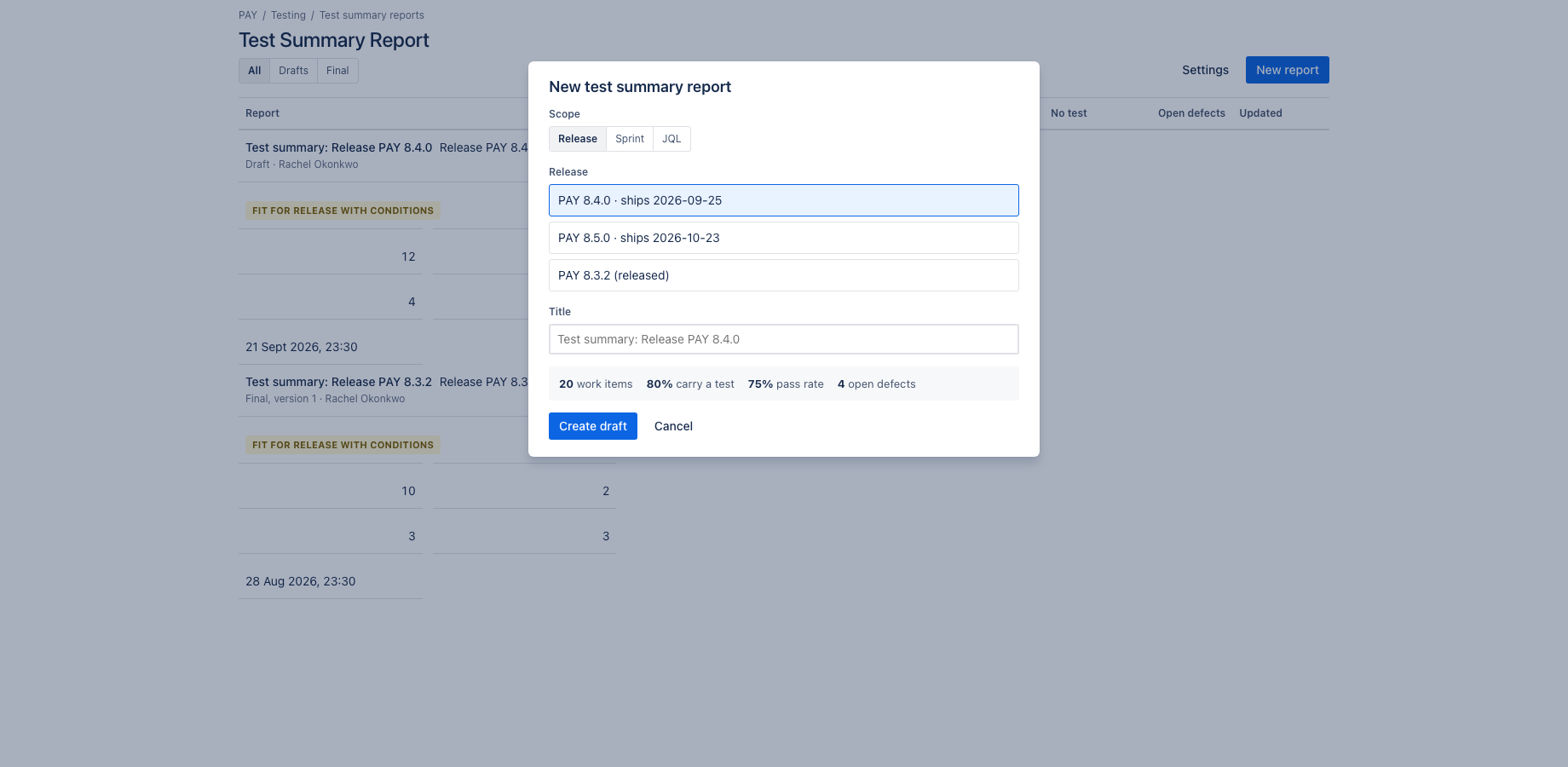
- Click New report, choose the scope (release, sprint or JQL) and give the report a title. The numbers are computed live from Jira.
- Write the narrative on the right: summary, verdict, conditions, deviations, risks, recommendation. It saves as you type.
Using the app
The steps below follow the demo video, in the same order.
- Reports per project: scope, verdict, execution numbers, open defects; drafts and finals
- New report: scope by release, sprint or JQL; the numbers are computed live
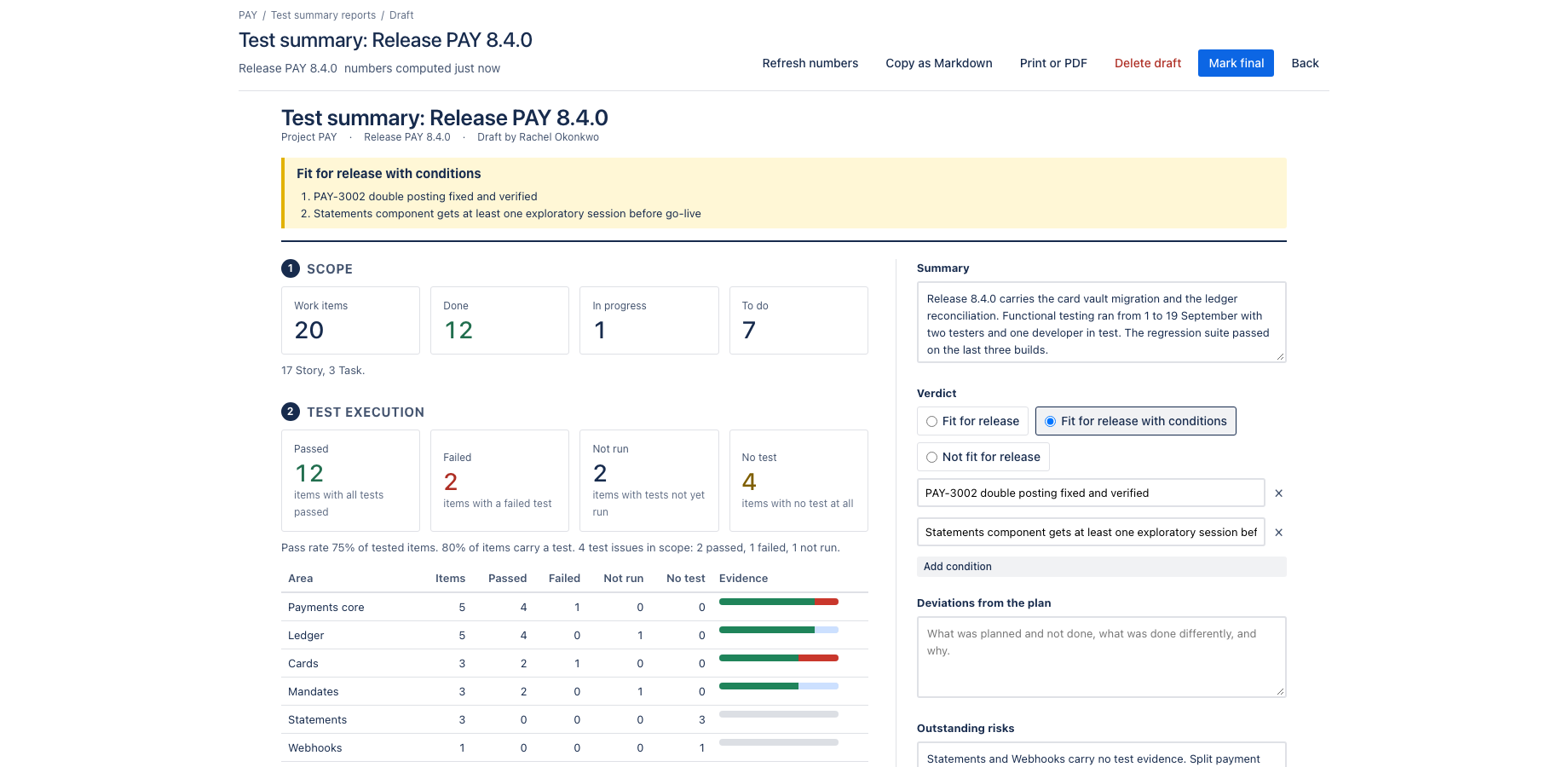
- Open the draft for release 8.4.0
- Section 1, scope: the work items and their state
- Section 2, test execution: passed, failed, not run and no test, per area
- Section 3, defects: in scope, open, high or highest, resolved, each key opens in Jira
- The narrative saves as you type: summary, verdict with conditions, deviations, risks
- Verdict with conditions; Add condition appends one
- Mark final locks numbers and narrative with the signer; a new version supersedes it
- Copy as Markdown or print to PDF for the steering committee
- Settings: which issue types are defects and tests, link types, and the grouping
Verify it works
A short test script. Each step names what to do and what you should see. Together they cover every module of the app.
| # | Do this | Expected result |
|---|---|---|
| 1 | Create a report scoped to a release. | Section 1 lists the work items in scope by type and status; the count matches fixVersion = "name" in Jira. |
| 2 | Link a test issue to a work item in scope with the link type tests, set the test to a passed status, and click Refresh numbers. | Section 2 counts one more passed test and the pass rate changes. |
| 3 | Open a Bug in the scope and set it to a high priority. | Section 3 lists it under open defects at that priority; its key opens in Jira. |
| 4 | Type in the narrative and reload the page. | The text is still there. |
| 5 | Click Mark final. | Numbers and narrative are locked, the signer and time are recorded. Refresh numbers is no longer offered. |
| 6 | Click New version on the final report. | A new draft is created; the final version stays readable and is marked as superseded once the new one is final. |
| 7 | Add the Test summary gadget to a dashboard. | It shows the latest final verdict for the project. |
Screenshots
Permissions and data
Scopes and why
- read:jira-work: read the issues in scope, their links, status, priority and components.
- read:jira-user: show author and signer display names.
- storage:app: keep reports and settings on the customer's site.
What the app stores
Reports (scope, computed numbers, narrative, status, signer account ID and display name, time, version) and per-project settings.
Everything is stored in Forge app storage on your own Atlassian site and removed under the Forge storage lifecycle when you uninstall. The app calls no external service, sends nothing out of Atlassian and uses no analytics. Data residency follows your site.
More in the privacy policy and the security policy for the apps.
Pricing, trial and support
Paid via Atlassian, per user, monthly or yearly, with a 30 day free trial. The current price for your user tier is on the Marketplace listing. Billing, invoices and cancellation run through your Atlassian site administration.
Questions, bugs and feature requests go to contact@toine.com. I answer within two working days, Monday to Friday, CET. Please add your site URL, the app name and a screenshot. Security issues go first: put "security" in the subject line. Terms are on the terms and licence page.