Documentation · Confluence Cloud · Toine.com B.V.
RAID Log for Confluence
A RAID log macro for project pages: risks scored by probability and impact, assumptions with a check date, issues with an action, dependencies with a needed-by date. Owners, status, a trail of updates, CSV export. A register across the site.
Marketplace listing · 30 day free trial, paid via Atlassian · Support: contact@toine.com · Updated 2026-10-07
What it does
RAID Log for Confluence keeps the four lists every project has somewhere, on the project page itself.
Insert the RAID log macro and add items. A risk is written as cause and effect and scored by probability and impact, one to five; the score puts it in a band and at the top of the table. An assumption gets a date by which it is checked. An issue gets an action and a due date. A dependency gets what is needed from whom and by when. Every item has an owner, a status (open, being handled, closed, accepted) and a trail of dated updates. Status and score changes are added to the trail automatically.
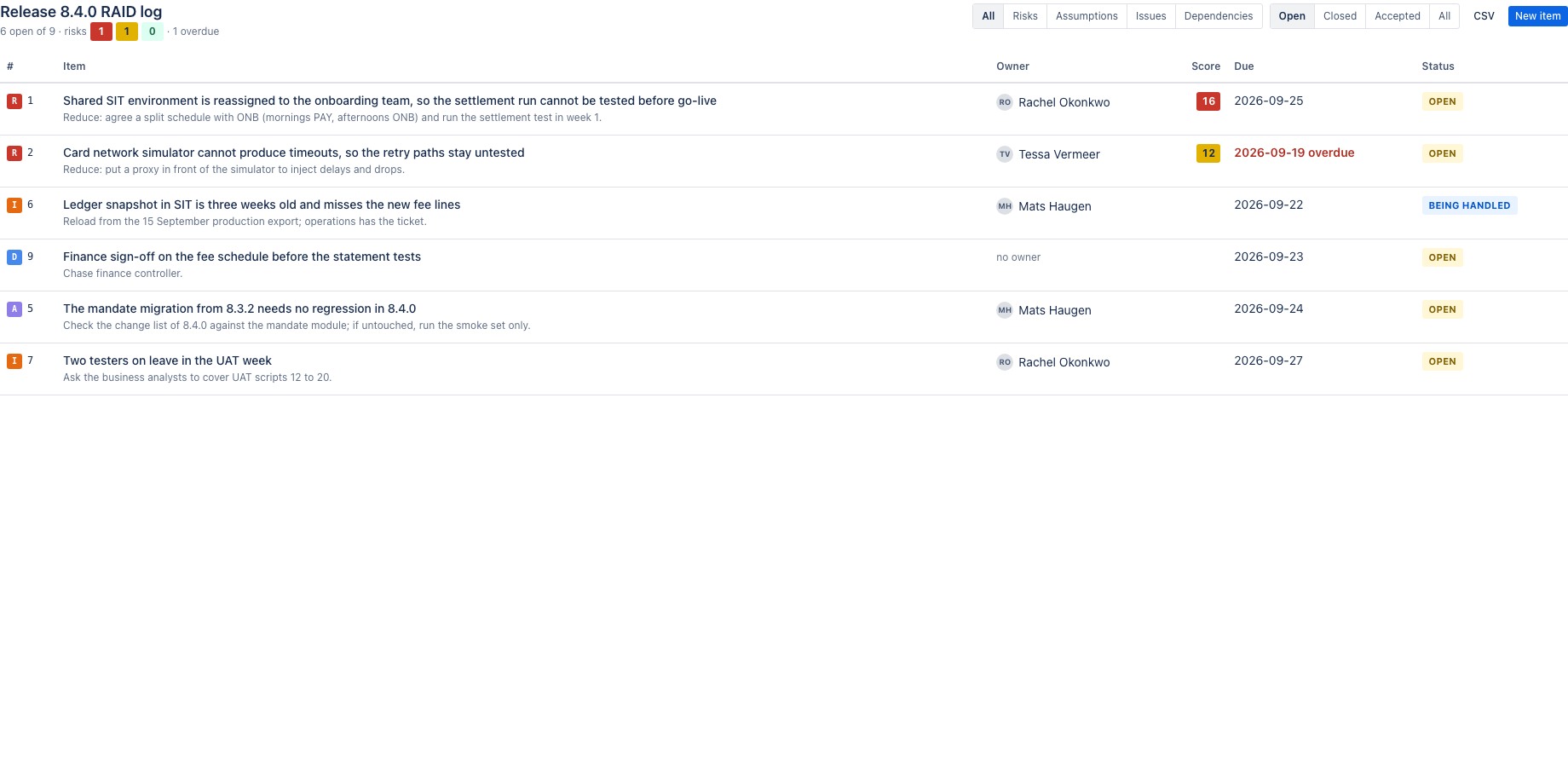
The table filters by type and status, sorts by score and due date, and flags overdue items and items without an owner. Export the log as CSV for the steering pack.
Works with Confluence Cloud.
Demo video
About a minute: the core features and the user flow, recorded in the app's demo mode with sample data from a fictional payments team. Every step carries a caption. RAID Log: risks, assumptions, issues and dependencies in a Confluence page, scored and owned.
Key features
Four kinds of item, one table
Risk, assumption, issue, dependency. Each with an owner, a status, a raised date, a due date and a response. Risks carry probability and impact from 1 to 5; the score and its band sort the table. Overdue and unowned items stand out.
A trail of updates
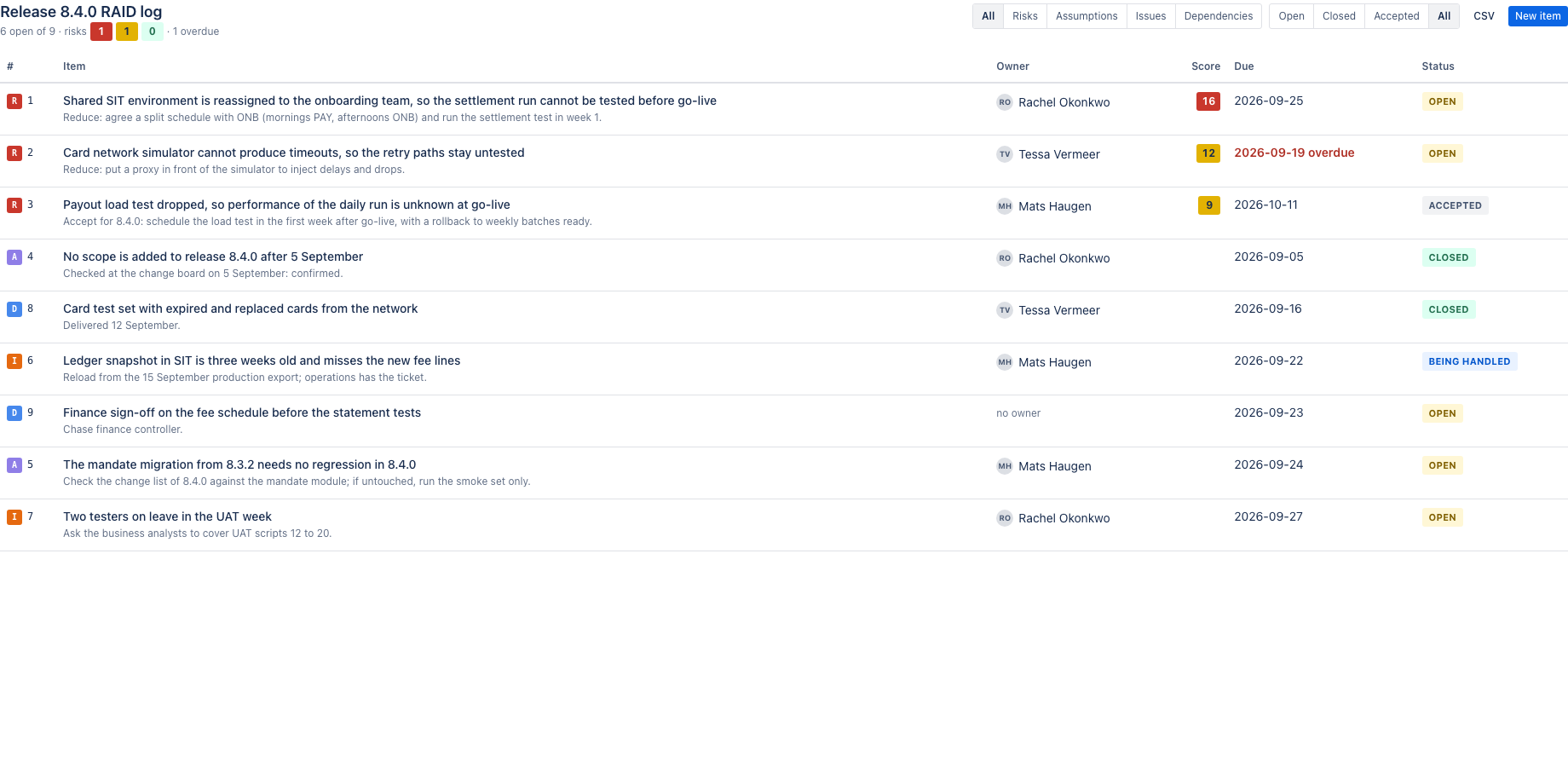
Every item keeps its updates with who and when. Status and score changes are recorded automatically. An item with updates cannot be deleted, only closed: the log is the record.
One RAID register for the whole site
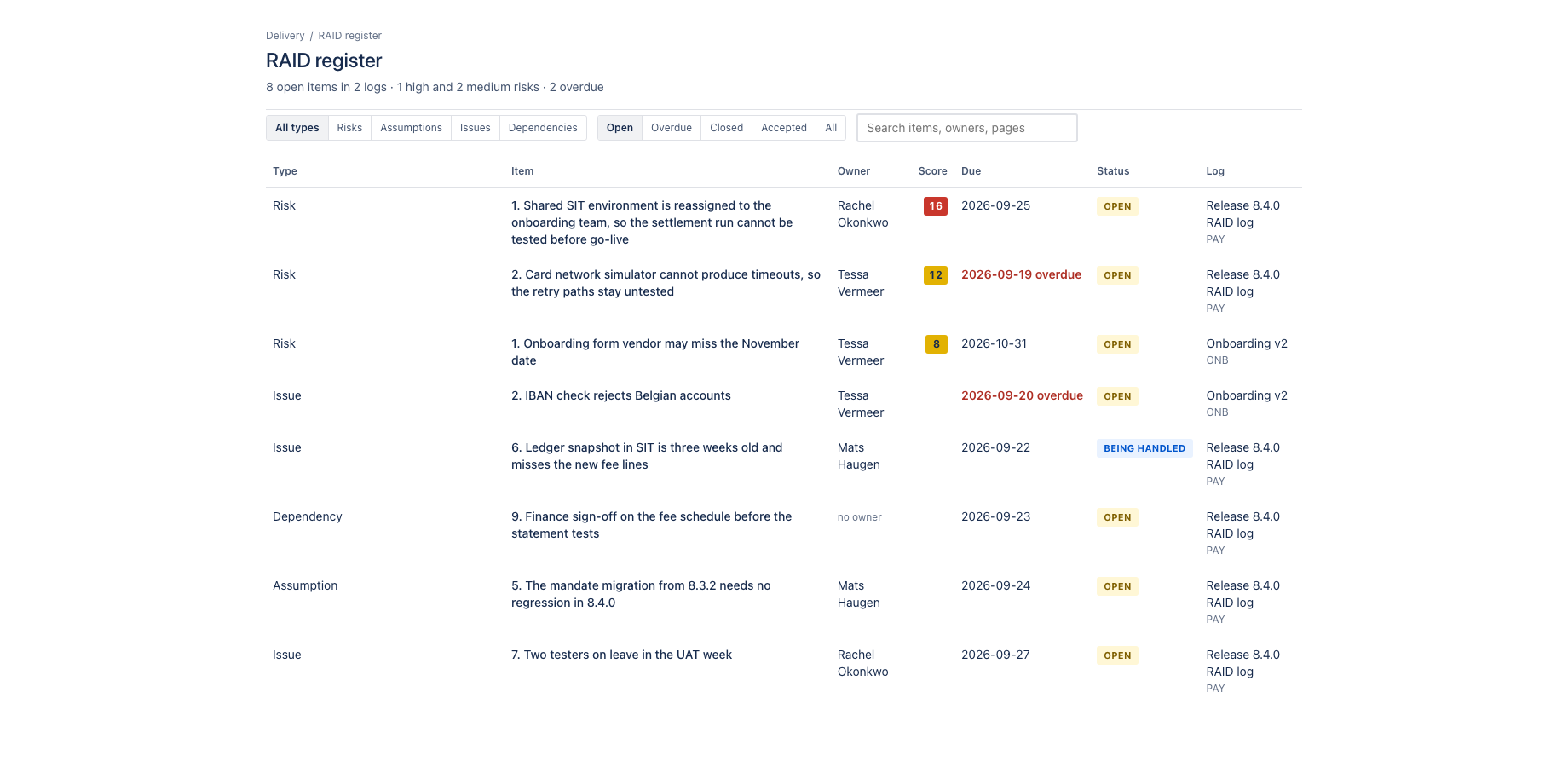
Every RAID log on every page feeds one register under Apps: highest risk first, filter by type and status, see what is overdue, open the page with one click.
The RAID register under Apps lists every item on the site, highest risk first, with filters by type and status, an overdue view and a search across items, owners and pages.
What it does not do: it never edits the page body, it calls no external service, and it keeps logs in Forge storage on your site, which is why it qualifies for the Runs on Atlassian programme.
Where it appears in Confluence
- Page macro
- RAID log macro: the log on the page where the team works.
- Global page
- Apps, RAID register: every item on the site, with filters and search.
Install and set up
Before you start
A Confluence page you can edit. One page can hold one log; a site can hold any number of logs.
Install
- In Confluence, open Apps in the top bar and choose Find new apps. Search for RAID Log for Confluence and click Try it free. You need to be a Confluence site administrator.
- Review the permissions. The app asks for
read:confluence-user,read:page:confluence,read:content-details:confluence,storage:app. It never edits a page body. - The 30 day trial starts on install. Billing after the trial is per user through Atlassian; nothing is charged if you uninstall before the trial ends.
Set up
- Edit a Confluence page, type /RAID log and insert the macro. Give the log a name and publish the page.
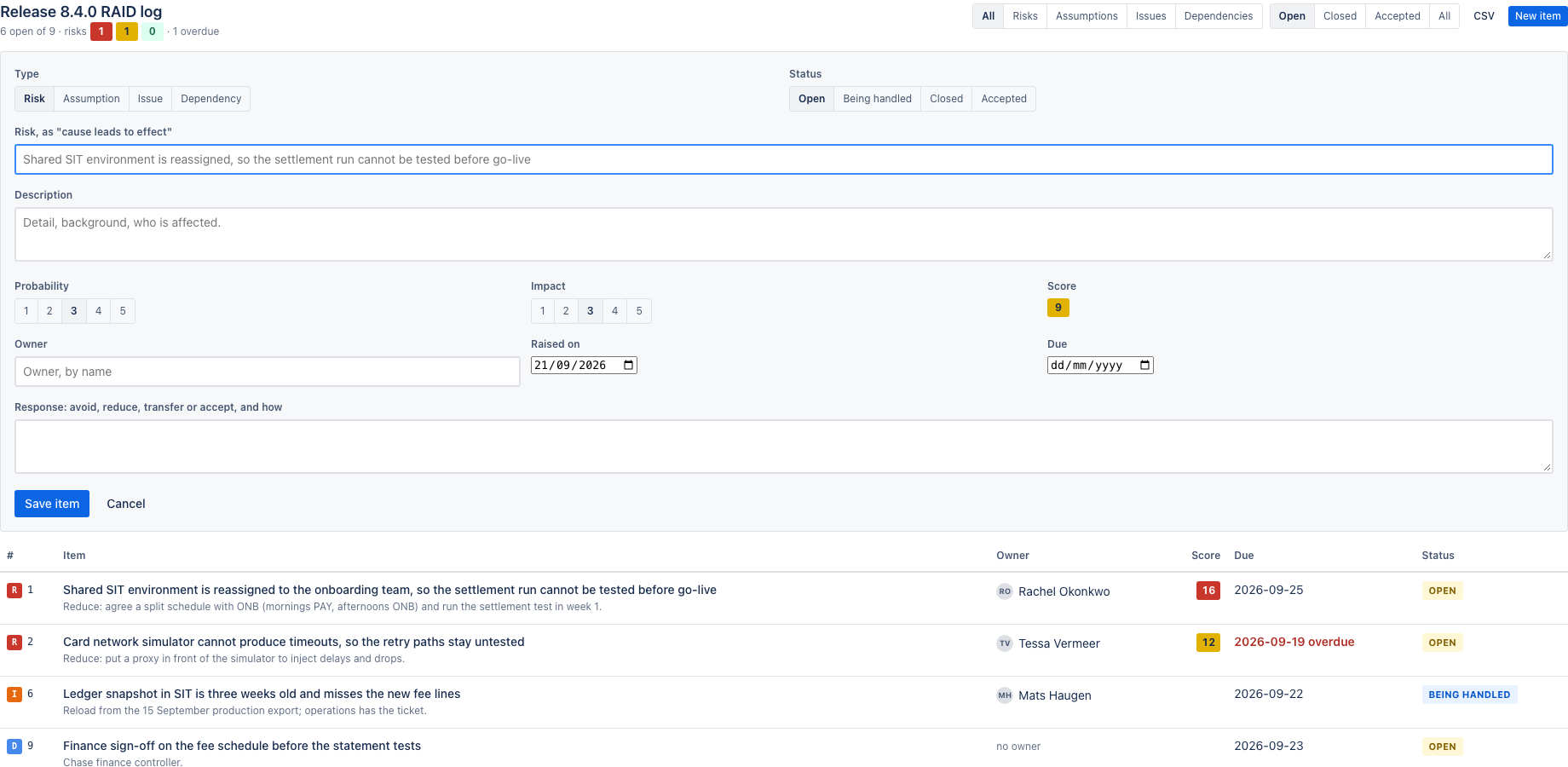
- Click New item in the macro and fill in the form. Save; the item appears in the log.
- Use the filters above the table to narrow the log, or Copy as Markdown to take a item elsewhere.
- Open Apps, RAID register for every item on the site.
Using the app
The steps below follow the demo video, in the same order.
- Filter by type and status; risks carry a probability times impact score
- Open an item: score band, owner, due date, response and the trail of updates
- Post an update; the trail keeps who said what, when
- New item: type, status, owner, probability and impact, due date and response
- Save: the item is scored and listed; CSV exports the whole log
- The RAID register: open items across every log on the site, highest score first
- Filter by type, overdue and status, or search items, owners and pages
Verify it works
A short test script. Each step names what to do and what you should see. Together they cover every module of the app.
| # | Do this | Expected result |
|---|---|---|
| 1 | Insert the RAID log macro and add a risk with probability 3 and impact 4. | The item shows score 12 and its band, and sorts above lower scores. |
| 2 | Add an issue with a due date in the past. | It is flagged overdue in the table and in the register's overdue view. |
| 3 | Post an update on an item. | The trail shows the update with who and when; changing status or score adds an automatic line to the trail. |
| 4 | Filter by type Risks and status Open. | Only matching items remain. |
| 5 | Click Export CSV. | A CSV with every item in the log downloads. |
| 6 | Open Apps, RAID register. | Items from every log on the site, highest score first. |
Screenshots
Permissions and data
Scopes and why
- read:confluence-user: find owners by name and show display names.
- read:page:confluence and read:content-details:confluence: show page titles in the register and search users.
- storage:app: keep logs on the customer's site.
What the app stores
RAID items (type, title, owner account ID and display name, status, probability, impact, dates, response, updates with author and time) per log, with the page ID the log lives on.
Everything is stored in Forge app storage on your own Atlassian site and removed under the Forge storage lifecycle when you uninstall. The app calls no external service, sends nothing out of Atlassian and uses no analytics. Data residency follows your site.
More in the privacy policy and the security policy for the apps.
Pricing, trial and support
Paid via Atlassian, per user, monthly or yearly, with a 30 day free trial. The current price for your user tier is on the Marketplace listing. Billing, invoices and cancellation run through your Atlassian site administration.
Questions, bugs and feature requests go to contact@toine.com. I answer within two working days, Monday to Friday, CET. Please add your site URL, the app name and a screenshot. Security issues go first: put "security" in the subject line. Terms are on the terms and licence page.