Documentation · Jira Cloud · Toine.com B.V.
Defect Health for Jira
One page per project: how old the open defects are by priority, whether more come in than go out, where they were found, which ones came back, which severity and priority disagree, and what nobody has picked up. No writes to your issues.
Marketplace listing · 30 day free trial, paid via Atlassian · Support: contact@toine.com · Updated 2026-10-07
What it does
Defect Health for Jira answers the questions a test lead is asked in every status meeting: how many defects are open, how old are they, are we closing them faster than they arrive, how many reached production, and what is stuck?
It reads the defects of one project straight from Jira and lays them out on one page.
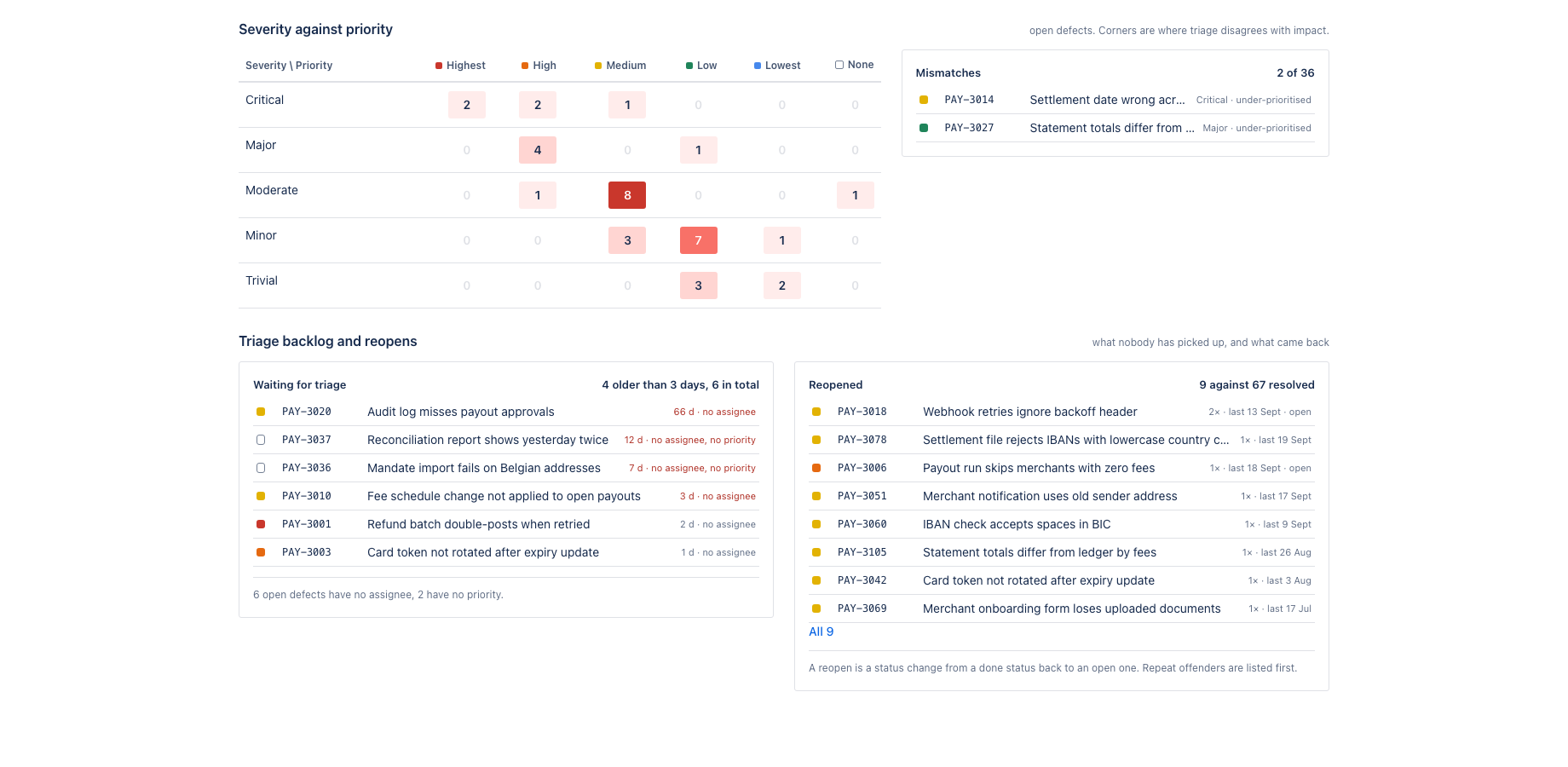
Ageing: open defects by age bucket and priority, with the median age per priority and the ten oldest. Inflow and outflow: created against resolved per week, the running open count, and the median and 90th percentile time to resolve per priority. Where defects were found: development, system test, acceptance or production, with the escape rate. Severity against priority: a matrix of open defects, with the mismatches listed. Triage backlog: open defects with no assignee or no priority past the agreed triage time. Reopens: defects that went from a done status back to an open one.
Works with Jira Cloud, company-managed and team-managed projects.
Demo video
About a minute: the core features and the user flow, recorded in the app's demo mode with sample data from a fictional payments team. Every step carries a caption. Defect Health: one page that shows how healthy the defect backlog of a Jira project is.
Key features
Ageing you can act on
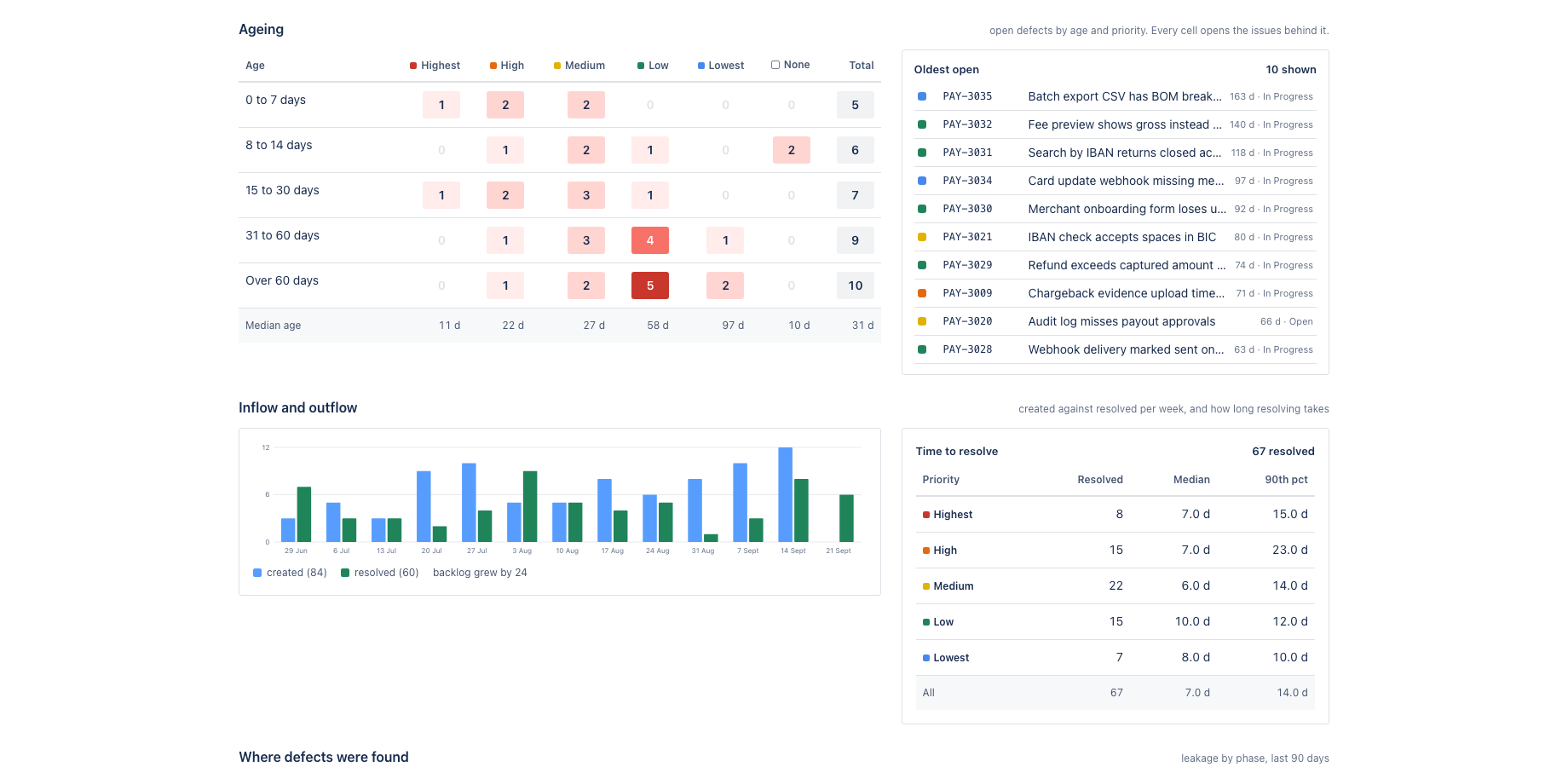
Open defects laid out by age bucket and priority. The corner that matters, high priority and long open, is the darkest cell. Every cell opens the issues behind it in Jira.
Escaped defects, without a test tool
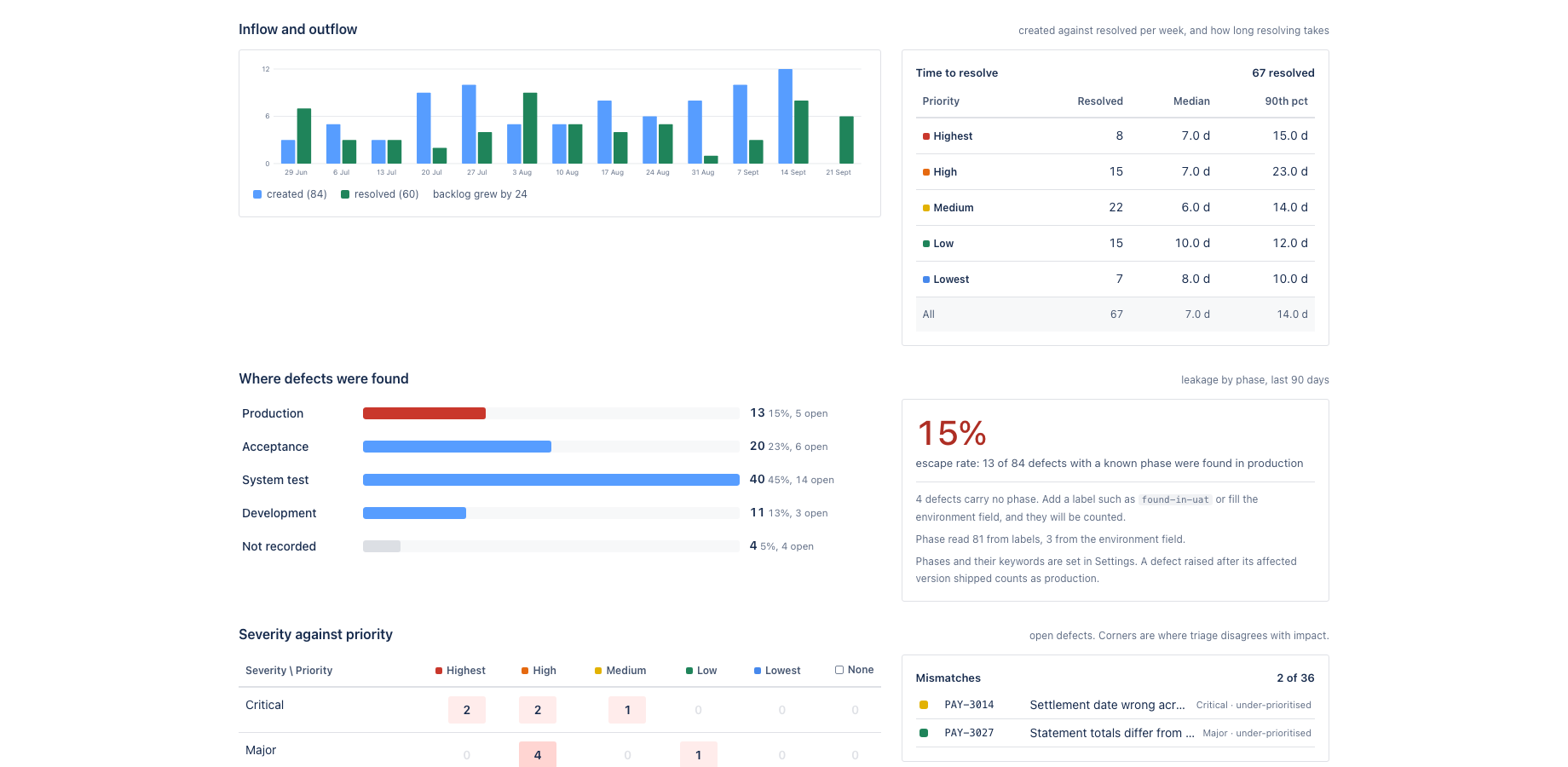
The phase a defect was found in is read from labels and the environment field. A defect raised after its affected version shipped counts as production. The escape rate sits next to the phases, with the defects that carry no phase called out.
Triage backlog and reopens
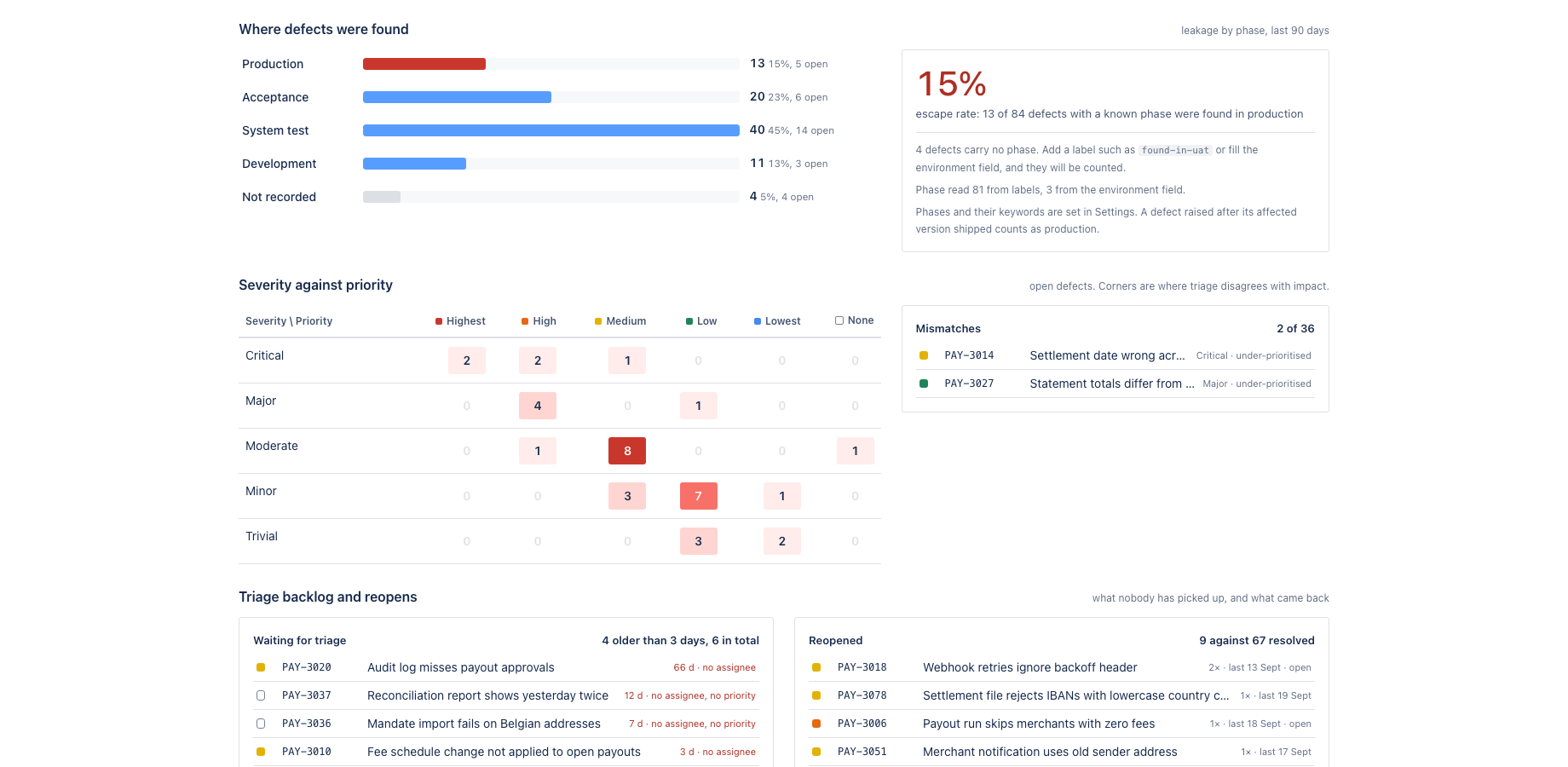
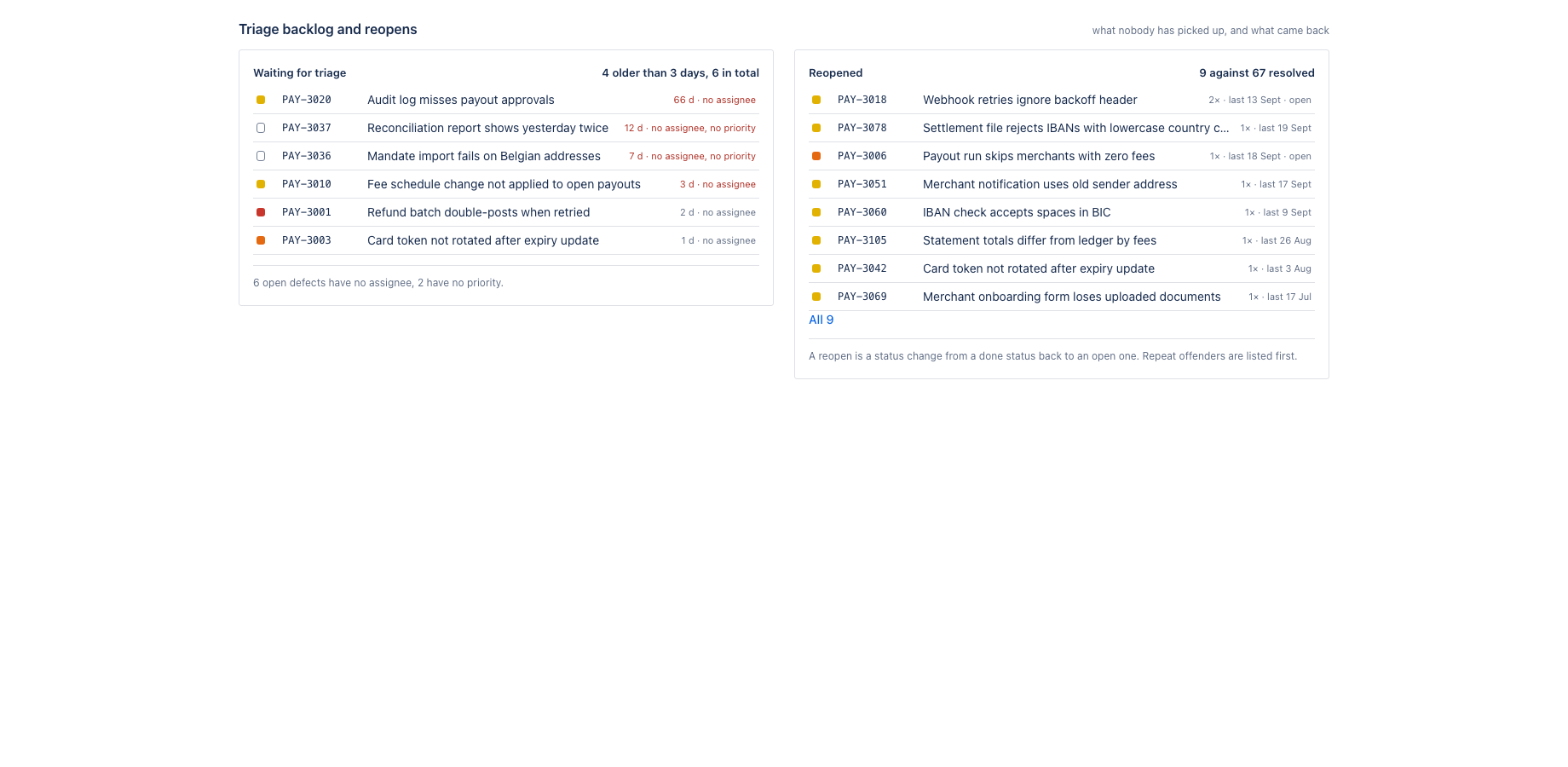
Defects with no owner or no priority beyond the agreed triage time, oldest first. Defects that went from done back to open, repeat offenders first. Both with the JQL to hand.
Every number opens the issues behind it, on the page first and in Jira with one click. The period is 30, 90 or 180 days. Export to CSV for the steering pack.
Phases come from labels such as found-in-uat or prod, from words in the environment field, and from the affected version: a defect raised after its version shipped is an escape. Severity is read from any single-select custom field named severity if you have one; everything else works without it.
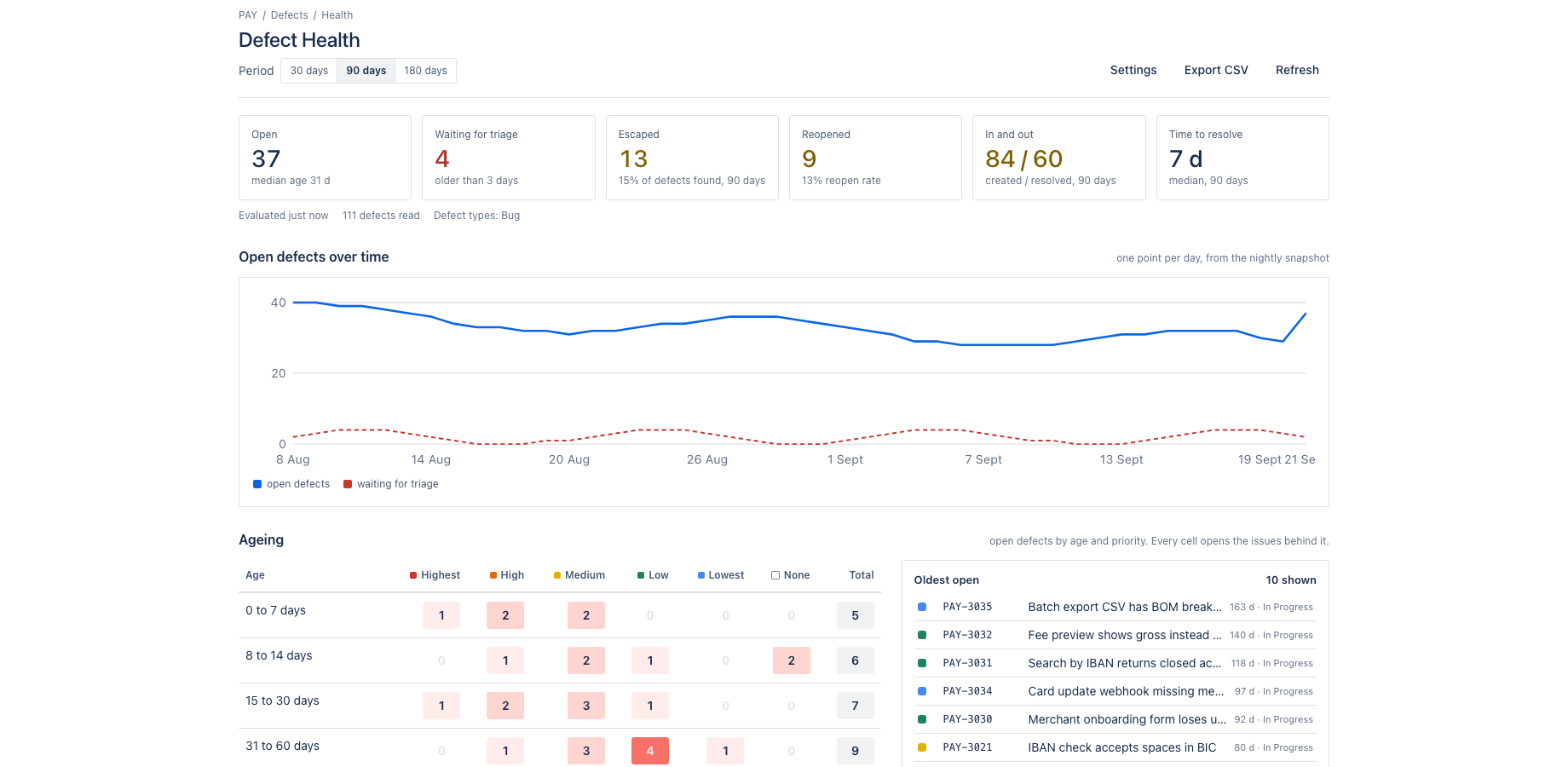
A nightly snapshot keeps the open count, median age and triage breaches per day, so the trend line shows whether the backlog is growing.
What it does not do: it writes nothing to your issues, it calls no external service, and it stores its own settings and daily snapshot in Forge storage on your site. That is why it qualifies for the Runs on Atlassian programme.
Where it appears in Jira
- Project page
- Defect Health in the sidebar of every project: the report for one project.
- Project settings
- Project settings, Defect Health: defect types, severity field, triage time, age buckets and phases.
- Dashboard gadget
- Defect health gadget: the five headline numbers for one project.
- Global page
- Apps, Defect Health: walk through several projects.
Install and set up
Before you start
A Jira project with defects. By default every issue of type Bug counts as a defect; other types can be added in the settings. Phases are read from labels such as found-in-uat or prod, from words in the Environment field and from the affected version. Severity is read from a single-select custom field named Severity if the site has one; everything else works without it.
Install
- In Jira, open Apps in the top bar and choose Explore more apps. Search for Defect Health for Jira and click Try it free. You need to be a Jira site administrator.
- Review the permissions. The app asks for
read:jira-work,read:jira-user,storage:app. It cannot create, change or delete anything in Jira. - The 30 day trial starts on install. Billing after the trial is per user through Atlassian; nothing is charged if you uninstall before the trial ends.
Set up
- Open a project and click Defect Health in the sidebar. The report is computed at once for the last 90 days.
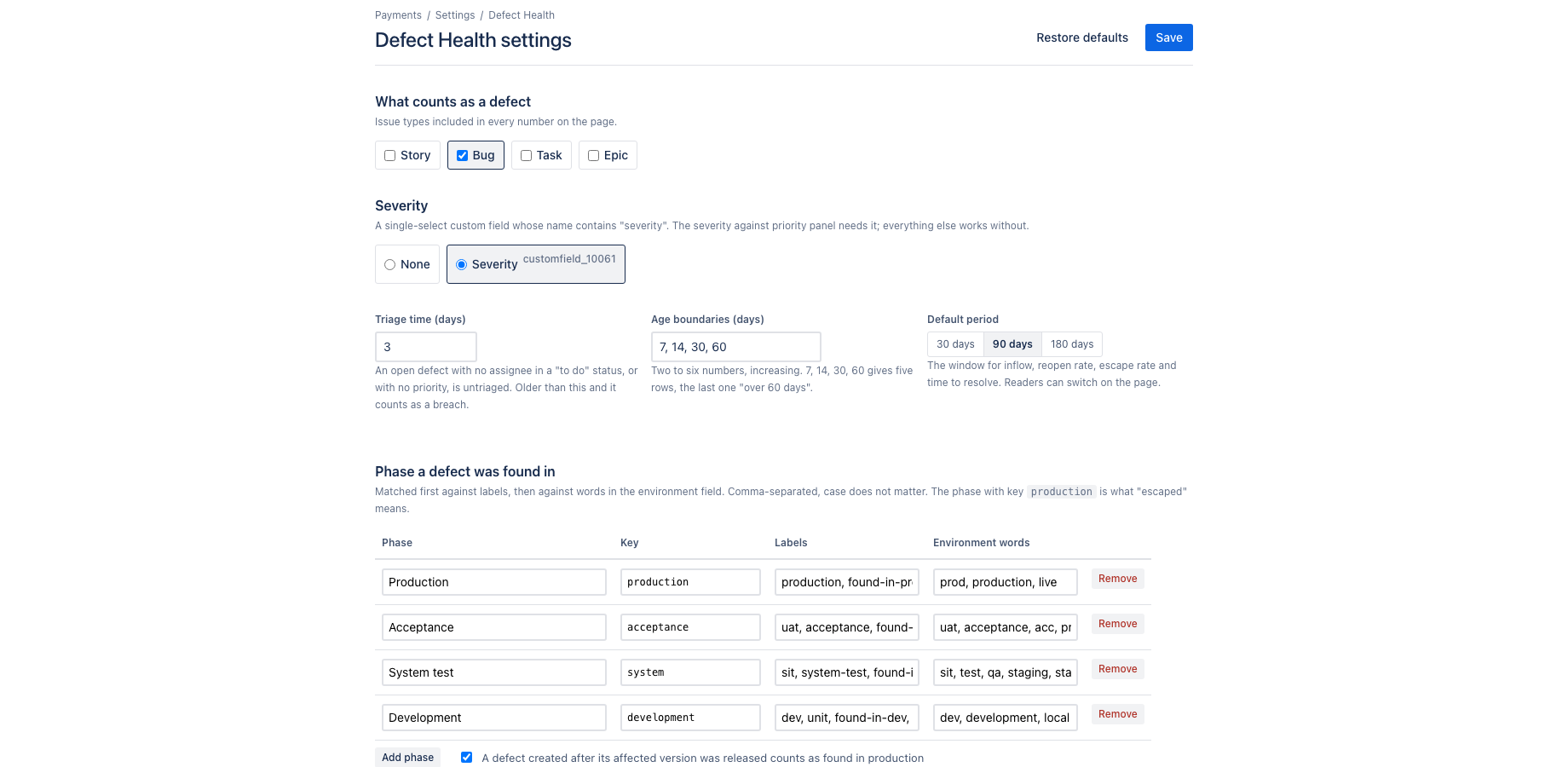
- Go to Project settings, Defect Health. Confirm which issue types count as defects, pick the severity field if you have one, set the agreed triage time in days, and adjust the age buckets if your team uses other boundaries.
- Under Phases map your labels and environment words to the phases development, system test, acceptance and production. Restore defaults brings the shipped mapping back at any time.
- Add the Defect health gadget to a dashboard for the headline numbers.
Using the app
The steps below follow the demo video, in the same order.
- Six headline numbers: open defects, triage backlog, escaped, reopened, in and out, time to resolve
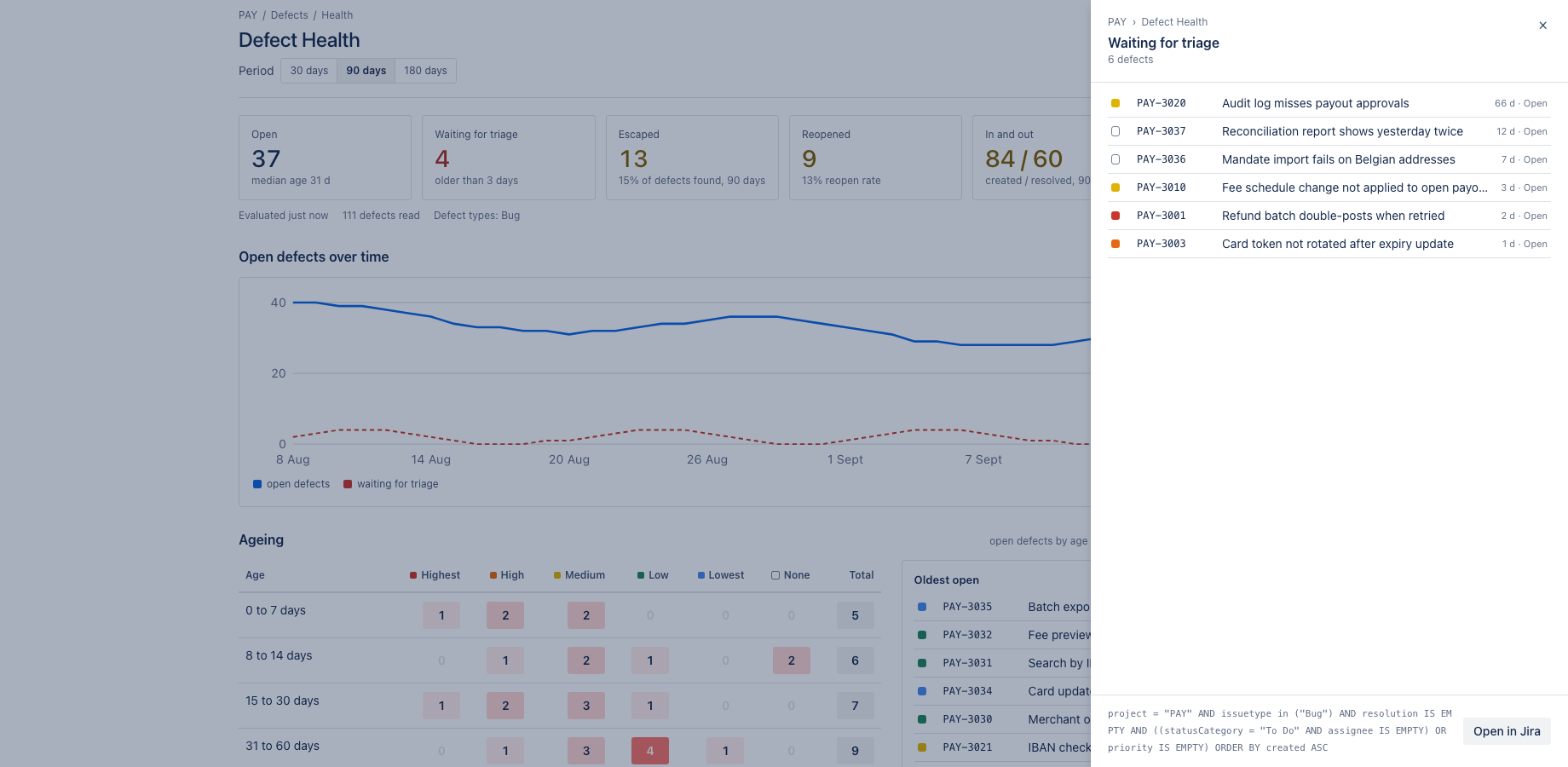
- Every number is a button: click it to see the issues behind it
- The drill-down lists the issues, each one opens in Jira
- Close the drill-down and switch the period: 30, 90 or 180 days
- Open defects over time, one point per day from the nightly snapshot
- Ageing: open defects by age and priority; every cell opens the issues behind it
- Inflow and outflow per week, with the time to resolve per priority
- Where defects were found: leakage by phase and the escape rate into production
- Severity against priority: the corners show where triage disagrees with impact
- Triage backlog and reopens: what nobody picked up, and what came back
- Settings: define what counts as a defect, the severity field and the phases
- Phases are read from labels or a field; the defaults can be restored at any time
Verify it works
A short test script. Each step names what to do and what you should see. Together they cover every module of the app.
| # | Do this | Expected result |
|---|---|---|
| 1 | Open the report for a project with open defects. | Six headline numbers: open defects, triage backlog, escaped, reopened, in and out, and time to resolve. |
| 2 | Click the Open defects number. | A drill-down lists the issues. Compare with the JQL project = KEY AND issuetype = Bug AND statusCategory != Done in Jira; the keys match. |
| 3 | Switch the period to 30 and then 180 days. | Inflow and outflow, time to resolve and the trend recompute for the chosen period. |
| 4 | Create a new Bug without an assignee and without a priority, then wait past the triage time (or set the triage time to 0 days for the test) and reload. | The defect appears in the Triage backlog list and the headline count goes up by one. |
| 5 | Add the label prod to one open defect and reload. | Under Where defects were found the production count and the escape rate go up by one defect. |
| 6 | Move a resolved defect back to an open status and reload. | It appears under Reopens. |
| 7 | Open the report the next day. | Open defects over time has a new point from the nightly snapshot. |
Screenshots
Permissions and data
Scopes and why
- read:jira-work: read defects, their fields, versions, components and changelog.
- read:jira-user: show assignee display names.
- storage:app: keep per-project settings and the daily snapshot on the customer's site.
What the app stores
Per-project settings (defect types, a custom field id, triage days, age boundaries, phase keywords) and one small record per day with the open count, median age, triage breaches, escaped and reopened counts. No issue content.
Everything is stored in Forge app storage on your own Atlassian site and removed under the Forge storage lifecycle when you uninstall. The app calls no external service, sends nothing out of Atlassian and uses no analytics. Data residency follows your site.
More in the privacy policy and the security policy for the apps.
Pricing, trial and support
Paid via Atlassian, per user, monthly or yearly, with a 30 day free trial. The current price for your user tier is on the Marketplace listing. Billing, invoices and cancellation run through your Atlassian site administration.
Questions, bugs and feature requests go to contact@toine.com. I answer within two working days, Monday to Friday, CET. Please add your site URL, the app name and a screenshot. Security issues go first: put "security" in the subject line. Terms are on the terms and licence page.