Documentation · Jira Cloud · Toine.com B.V.
AI System Register for Jira
One entry per AI system: purpose, owner, your role under the EU AI Act, the risk class you placed it in and why. The obligations for that class appear as a checklist with the article, next to the evidence and the next review. Stored on your site.
Marketplace listing · 30 day free trial, paid via Atlassian · Support: contact@toine.com · Updated 2026-10-07
What it does
AI System Register for Jira keeps the inventory the EU AI Act assumes you have: which AI systems your organisation develops, buys or uses, what each one does, who owns it, which role you play, and which risk class you placed it in.
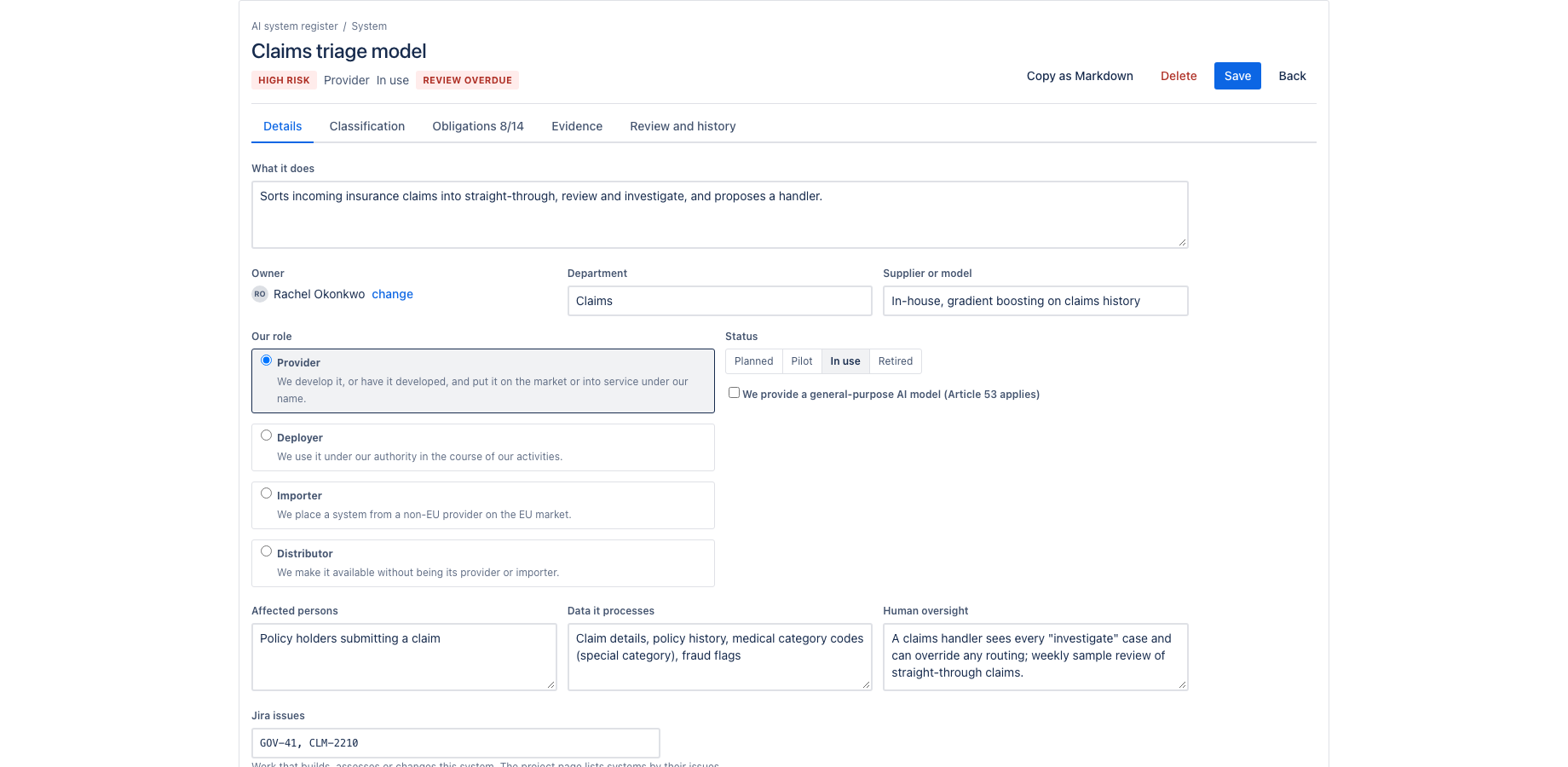
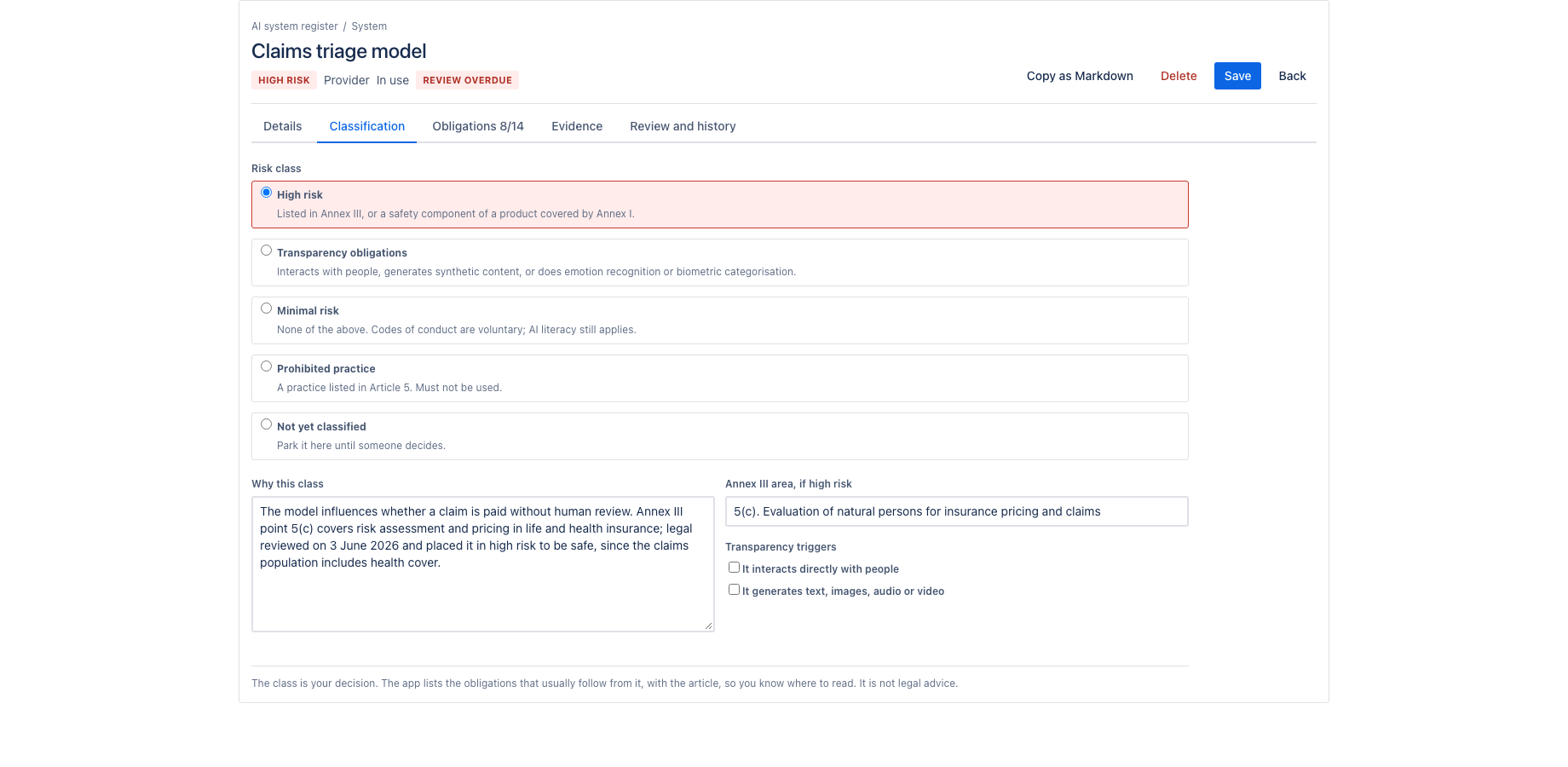
Each entry records the purpose, the affected persons, the data it processes, the human oversight, the supplier or model, the Jira issues that build or assess it, and the classification with its rationale: the Annex III area for a high-risk system, the transparency triggers for Article 50, or the reasoning for minimal risk.
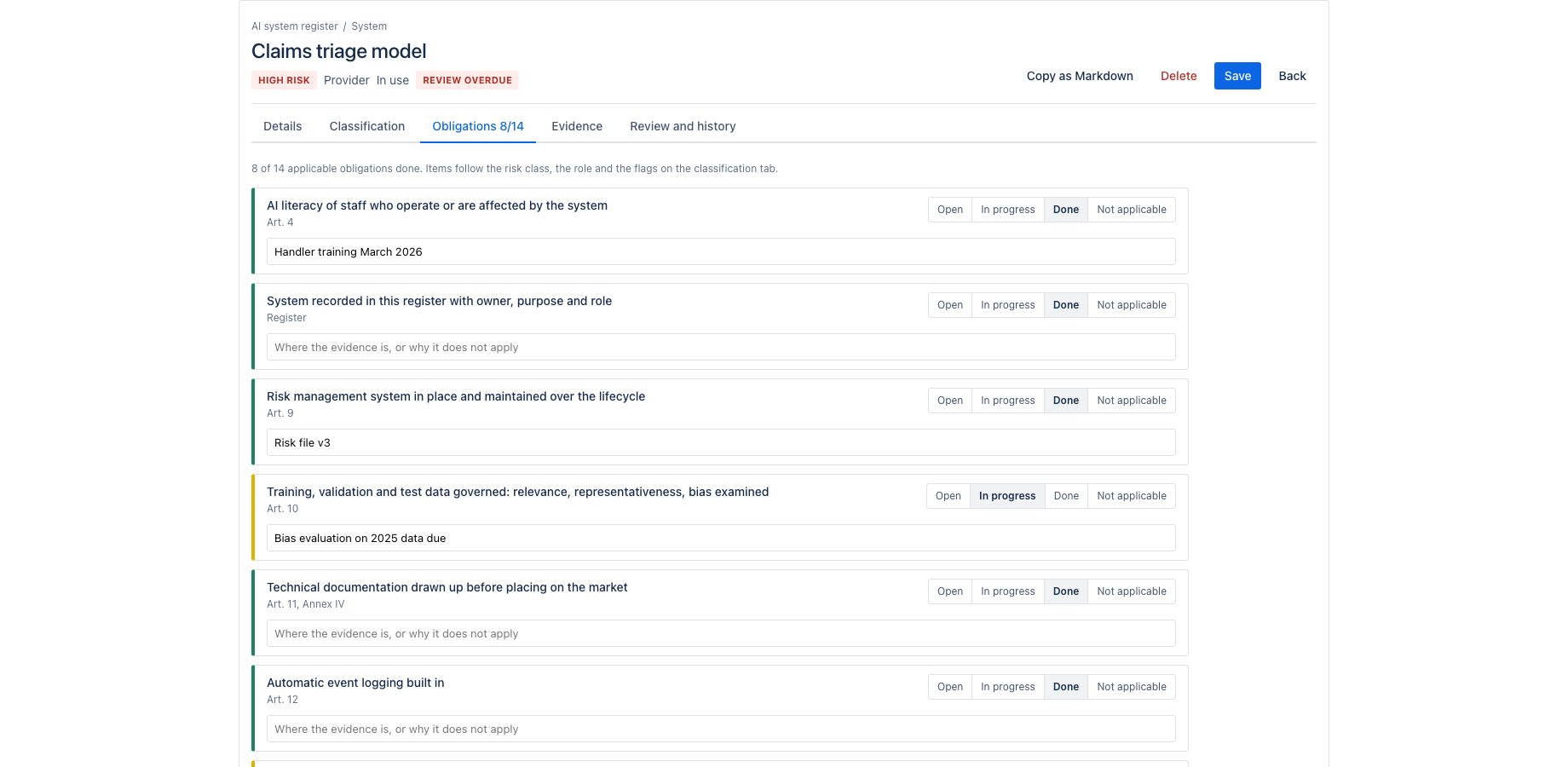
From the class and the role follows a checklist. A provider of a high-risk system sees the obligations of Articles 9 to 17, conformity assessment, EU database registration, post-market monitoring and incident reporting. A deployer sees Article 26: instructions for use, human oversight, input data, monitoring, logs, informing workers and affected persons, and the fundamental rights impact assessment where it applies. Transparency obligations of Article 50 appear for systems that interact with people or generate content. Providers of general-purpose AI models get Article 53. AI literacy, Article 4, is on every list. Each item is open, in progress, done or not applicable, with a note on where the evidence lives.
Works with Jira Cloud. A Confluence edition with the same register and a page macro is available separately.
Demo video
About a minute: the core features and the user flow, recorded in the app's demo mode with sample data from a fictional payments team. Every step carries a caption. AI System Register: a site wide register of AI systems for the EU AI Act, kept in Jira.
Key features
One register, every system
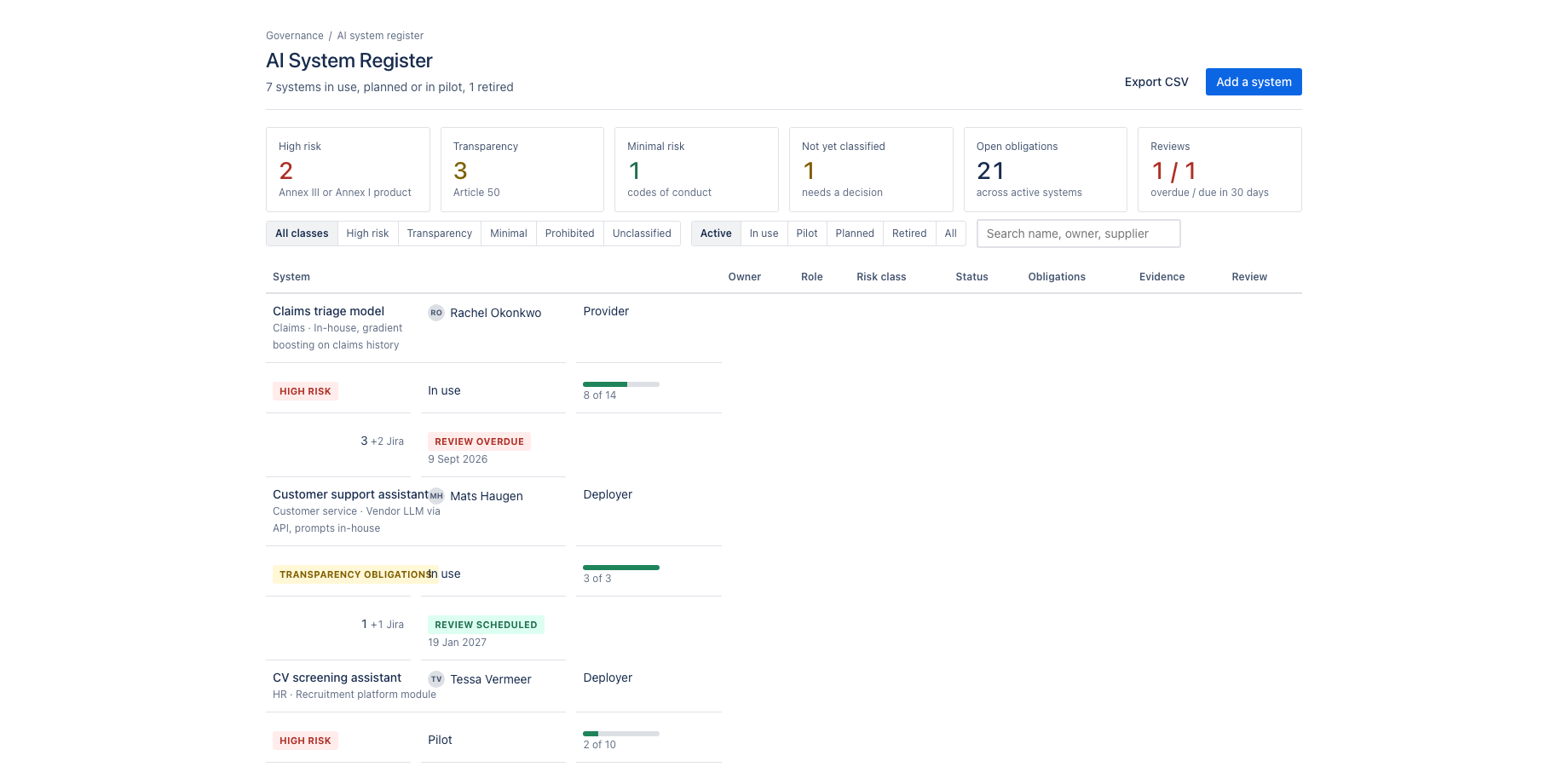
Name, purpose, owner, department, supplier, your role (provider, deployer, importer, distributor), status from planned to retired. Filters by class and status, search, CSV export. The dashboard gadget shows what is overdue.
The obligations that follow from the class
Choose the risk class and write why. The checklist for that class and role appears, in plain words, with the article it comes from: risk management, data governance, human oversight, transparency, logging, registration. Mark each open, in progress, done or not applicable, with a note on where the evidence is.
Evidence and reviews on record
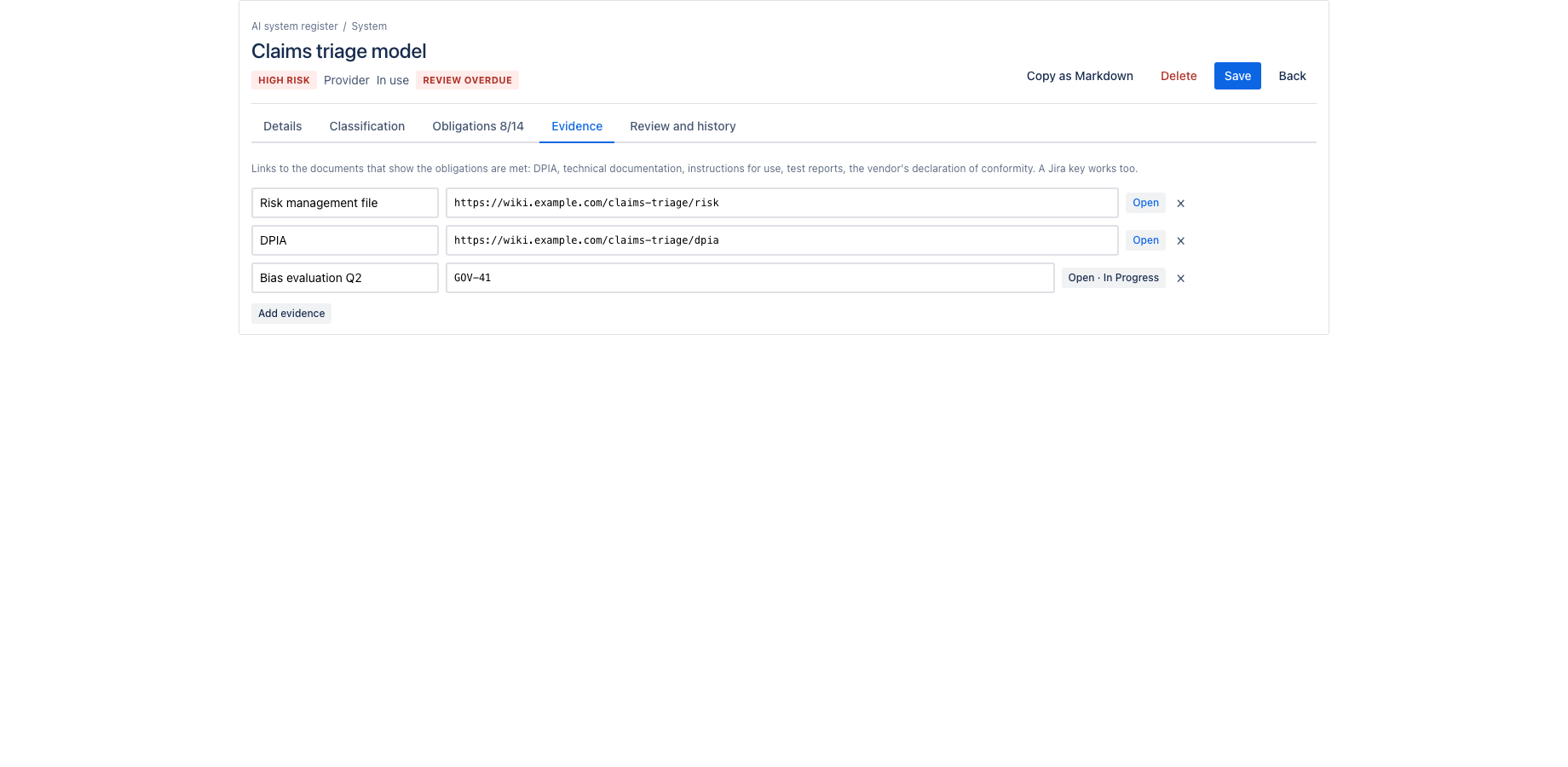
Links to the DPIA, the technical documentation, the vendor's declaration, the test report. A review cycle per system, reviews marked done with a note, and a history of every change of class, status, owner or review date.
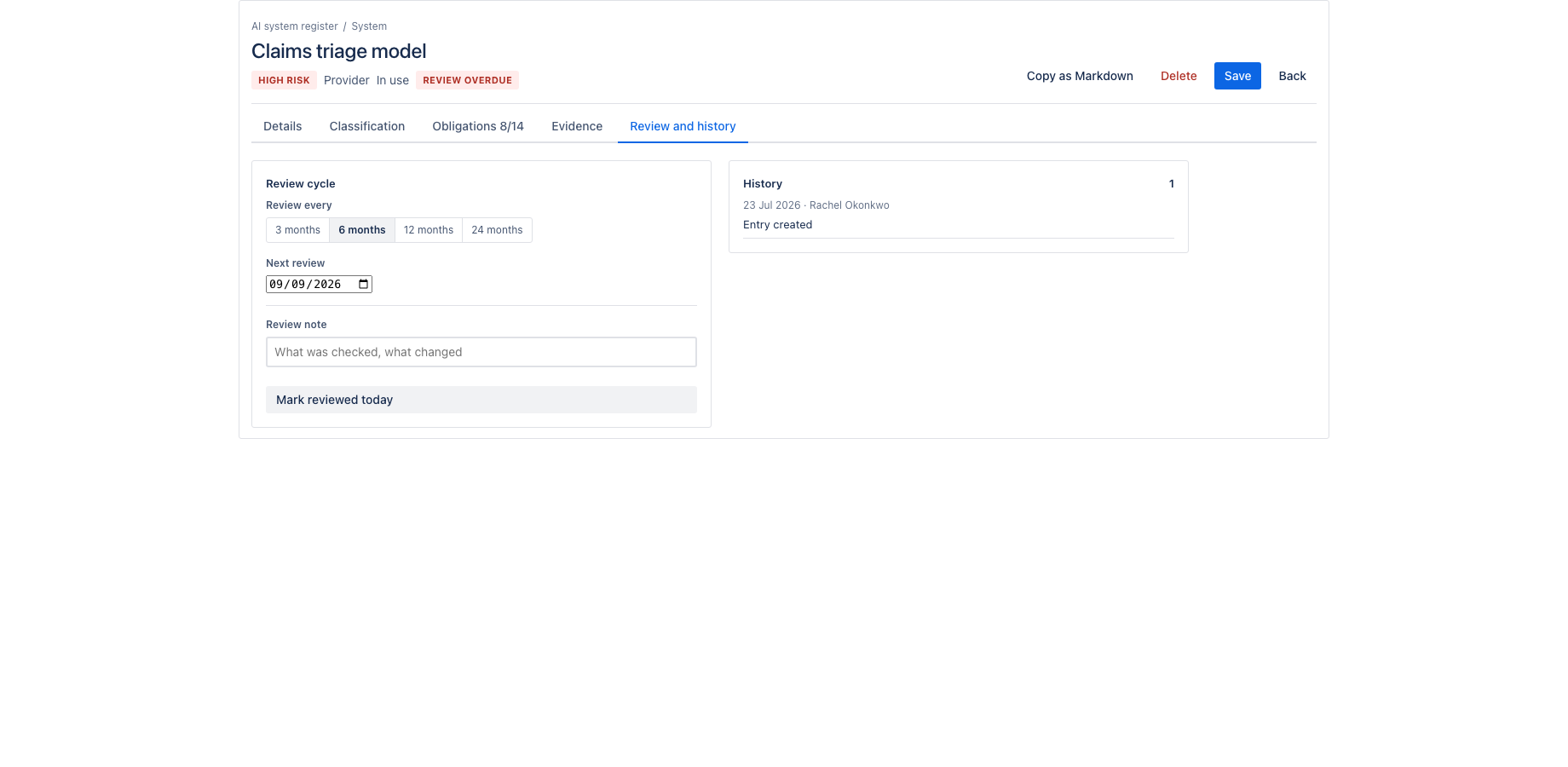
Evidence is a list of links and Jira keys per system. A review cycle of three to twenty-four months schedules the next review; marking it done records who and when and rolls the date forward. The history keeps every change of class, status, owner and review date.
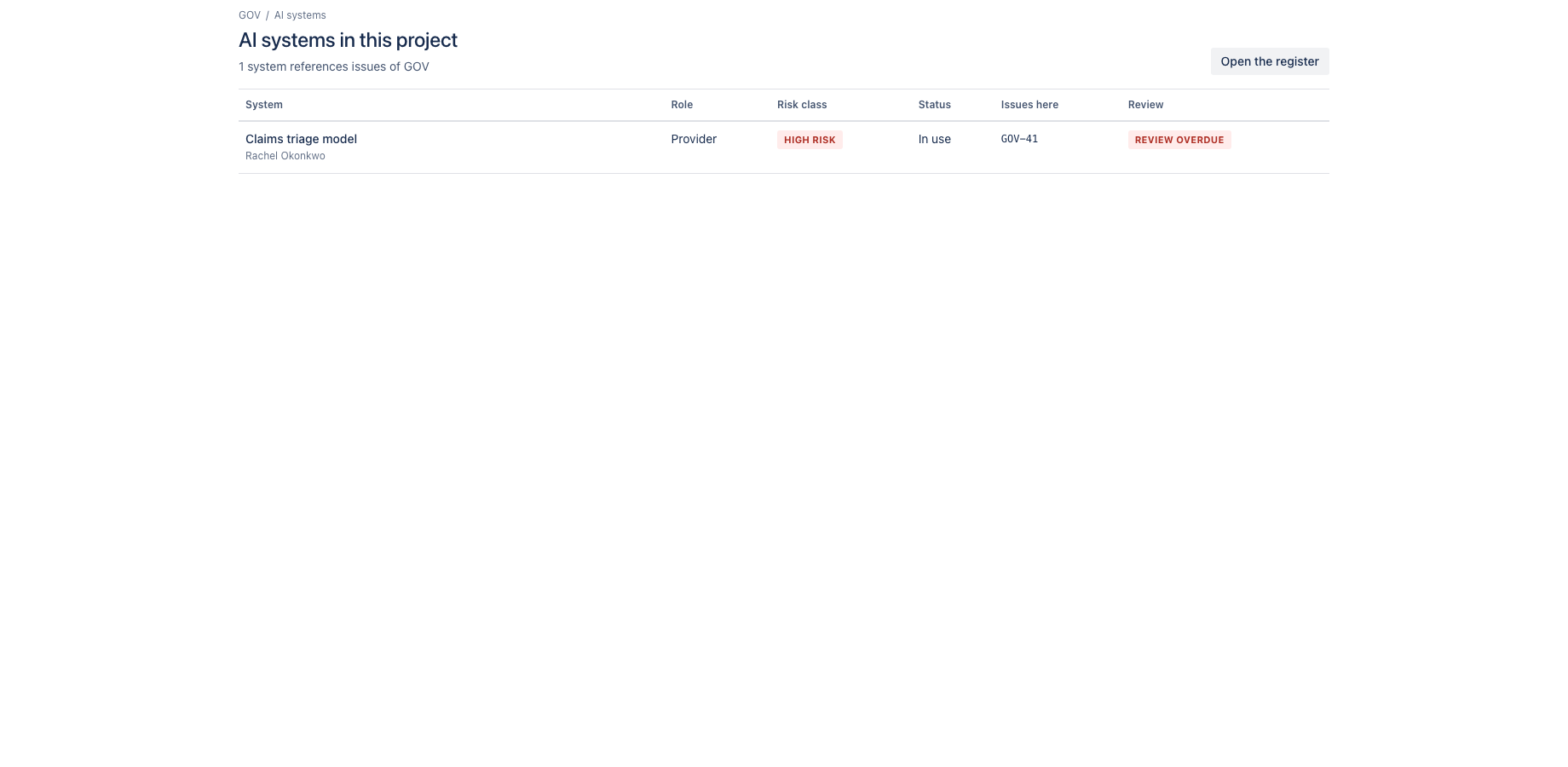
The register page shows all systems with filters by class and status, the open obligations, the reviews overdue and due, and the systems nobody has classified yet. A project page lists the systems whose issues live in that project. A dashboard gadget shows the totals. Export the register as CSV, or one entry as Markdown.
The checklist cites the articles it comes from: Article 4 (AI literacy), Article 5 (prohibited practices), Articles 9 to 17 (high-risk providers), Articles 23 and 24 (importers and distributors), Article 26 and 27 (deployers, fundamental rights impact assessment), Articles 43 to 49 (conformity, CE marking, EU database), Article 50 (transparency), Articles 53 and 55 (general-purpose AI models), Articles 72 and 73 (post-market monitoring, serious incidents).
What it does not do: it does not classify systems and it gives no legal advice. The classification and the checklist are yours; the app keeps the record. It writes nothing to your issues, calls no external service and stores the register in Forge storage on your site, which is why it qualifies for the Runs on Atlassian programme.
Where it appears in Jira
- Global page
- Apps, AI System Register: the register for the whole site.
- Project page
- AI systems in the sidebar of every project: the systems whose referenced issues live in that project.
- Dashboard gadget
- AI system register gadget: systems by risk class, obligations still open and reviews due.
Install and set up
Before you start
Any Jira site. The register is site wide; entries can reference Jira issues from any project.
Install
- In Jira, open Apps in the top bar and choose Explore more apps. Search for AI System Register for Jira and click Try it free. You need to be a Jira site administrator.
- Review the permissions. The app asks for
read:jira-work,read:jira-user,storage:app. It cannot create, change or delete anything in Jira. - The 30 day trial starts on install. Billing after the trial is per user through Atlassian; nothing is charged if you uninstall before the trial ends.
Set up
- Open Apps, AI System Register and click Add system. Enter name, purpose, owner, your role (provider, deployer, importer or distributor) and the supplier or model.
- Open Classification and record the risk class with its rationale: the Annex III area for a high-risk system, the Article 50 transparency triggers, or the reasoning for minimal risk.
- Open Obligations. The checklist for that class and role is generated with article references. Mark each item open, in progress, done or not applicable and note where the evidence lives.
- Set the review cycle (three to twenty-four months) and add evidence links and Jira keys.
Using the app
The steps below follow the demo video, in the same order.
- Headline: systems per risk class, open obligations and reviews that are due
- Filter by risk class and status, or search by name, owner and supplier
- Open a system: details, purpose, owner, role and supplier
- Classification: role, risk class, Annex III category and the rationale for the decision
- Obligations: a checklist per class and role, each with its article reference
- Evidence links, and a review cycle with history
- Add a system starts an empty entry; Copy as Markdown and CSV export for auditors
- The project page lists the systems linked to issues in that project
Verify it works
A short test script. Each step names what to do and what you should see. Together they cover every module of the app.
| # | Do this | Expected result |
|---|---|---|
| 1 | Add a system and classify it as high risk with role provider. | The obligations list shows Articles 9 to 17, conformity assessment, EU database registration, post-market monitoring and incident reporting, plus Article 4 (AI literacy). |
| 2 | Change the role to deployer. | The list changes to the Article 26 obligations and the fundamental rights impact assessment where it applies. The history records the change. |
| 3 | Mark an obligation done and reload. | The headline count of open obligations goes down by one. |
| 4 | Set a review cycle and click Mark review done. | The next review date rolls forward; the history shows who and when. |
| 5 | Add a Jira issue key from project X to the entry, then open AI systems in that project. | The system is listed there. |
| 6 | Click Export CSV. | A CSV with every system, class, status and review date downloads. |
Screenshots
Permissions and data
Scopes and why
- read:jira-work: read titles and status of the issues an entry references.
- read:jira-user: find and show owners and reviewers by display name.
- storage:app: keep the register on the customer's site.
What the app stores
The register: systems, classification and rationale, obligations with status and notes, evidence links and Jira keys, review dates and history, owner account IDs and display names.
Everything is stored in Forge app storage on your own Atlassian site and removed under the Forge storage lifecycle when you uninstall. The app calls no external service, sends nothing out of Atlassian and uses no analytics. Data residency follows your site.
More in the privacy policy and the security policy for the apps.
Pricing, trial and support
Paid via Atlassian, per user, monthly or yearly, with a 30 day free trial. The current price for your user tier is on the Marketplace listing. Billing, invoices and cancellation run through your Atlassian site administration.
Questions, bugs and feature requests go to contact@toine.com. I answer within two working days, Monday to Friday, CET. Please add your site URL, the app name and a screenshot. Security issues go first: put "security" in the subject line. Terms are on the terms and licence page.